Universal vs Brand-Specific Vacuum Batteries: What Actually Fits and What Doesn’t
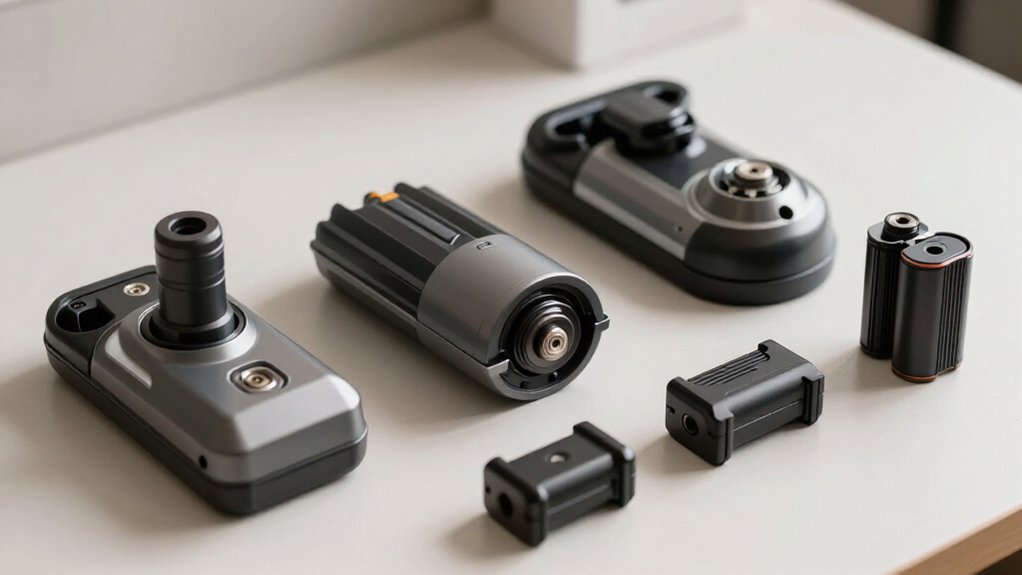
Universal batteries fit only when the mount, voltage profile, B+/B−/T contacts, identification signals, and BMS communication all match your vacuum. A pack that clicks in may still refuse charging, reduce boost power, or lose thermal protection.
Brand-specific OEM batteries usually deliver safer charging, steadier full-suction runtime, and dock alignment; aftermarket packs can cost less but vary widely.
For pet hair, prioritize sustained discharge over advertised amp-hours. You’ll find comparisons ahead clarifying each brand and constraint.
Dyson, Shark, Bissell Compared
When comparing Dyson, Shark, and Bissell cordless vacuums, brand-specific OEM batteries generally provide the most reliable fit, runtime, charging behavior, and electronic compatibility. Dyson OEM packs usually preserve advertised power modes and runtime consistency while aftermarket quality varies, especially under boost loads. Shark batteries can offer competitive endurance, but model-specific verification remains essential. Bissell replacements often cost less, yet seller quality and service support differ.
| Brand | OEM advantage | Aftermarket concern |
|---|---|---|
| Dyson | Consistent control | Runtime variation |
| Shark | Reliable charging | Fit uncertainty |
For you, OEM remains the lowest-effort choice when warranty coverage, docking, and predictable maintenance matter. A universal pack can save money, but test its model listing, return policy, certifications, and expected service life before purchase. Don’t assume one brand’s battery transfers to another without verification.
Battery Connectors and Voltages
Battery compatibility depends on more than whether a connector physically fits: the pack’s voltage profile, terminal layout, and communication signals must match the vacuum. A universal pack may slide in yet fail electrically or disable protection. Many platforms use roughly 18V-class packs, while 20V Max systems advertise a similar category; that doesn’t guarantee identical load behavior.
Check these points before buying:
- Confirm the manufacturer’s specified nominal voltage and model list.
- Match B+ and B− positions, mechanical rails, and latch geometry exactly.
- Verify the T thermistor and any communication pin support the vacuum’s BMS.
Adapters help only when they route every required signal correctly. OEM packs usually preserve charger protocols and firmware protections; universal options need documented pinouts, certifications, and model-specific testing.
Runtime at Full Suction
At full suction, runtime depends on usable watt-hours and sustained discharge capability, not the pack’s advertised amp-hour rating alone. You’ll see shorter operation when a high-current demand causes voltage sag, especially in budget universal packs with weaker cells. A brand-specific OEM pack typically maintains its rated output longer because its cells, BMS thresholds, and vacuum firmware are matched.
Smart communication can also matter. If a universal battery or adapter negotiates poorly, the vacuum may limit power or enter protection earlier, even when it starts normally. Missing or inaccurate temperature signals can trigger high-load throttling, further reducing runtime.
Compare packs using continuous-discharge test data under load, not capacity claims alone. Expect full-suction runtime to fall well below eco-mode figures, and expect third-party results to vary widely.
Swapping Batteries Mid-Clean
A mid-clean swap works reliably only when the replacement pack matches the vacuum’s mount and B+ / B− / thermistor (T) contact layout, not merely when it clicks into place. Universal packs guarantee physical fit, whereas brand-specific packs usually preserve the rail, latch, and contact arrangement. Before restarting, you should:
- Select the adapter or mount made for your vacuum’s brand and model; don’t assume one universal setting suits every pinout.
- Confirm the pack’s voltage and chemistry match the vacuum’s specification, then inspect terminals for damage or contamination.
- Run the vacuum briefly at a moderate setting and verify stable suction and power draw before resuming full work.
If output falls, the motor pulses, or charging behavior changes later, stop using the pack. A documented OEM replacement generally offers more predictable swapping and safety than a low-cost universal alternative.
Match BMS Communication Protocols
Once the replacement pack fits the mount, you still need to verify that its BMS communicates correctly with the vacuum. A universal pack may slide into several models yet fail because its brand-specific ID or thermistor line doesn’t match the vacuum’s expectations. If the platform uses a dedicated temperature pin alongside B+ and B−, the pack must route and interpret that signal accurately.
Otherwise, the vacuum may refuse operation or lose heat-based throttling.
Brand-specific packs preserve the expected handshake, including smart contacts that support protection and fuel-gauge data. An adapter can align terminals, but it can’t create missing electronics. Before buying, compare the listed pin configuration with your model. Prefer documentation and UL or ETL evidence that the pack’s behavior matches protocol requirements.
Filter Costs and Warranty
Although universal vacuum batteries often cost less initially, they can carry higher long-term costs if their adapter, BMS, or thermistor signaling doesn’t fully match the vacuum. A physical fit and successful startup don’t prove correct electrical communication. Sagging output can destabilize suction, fill filters faster, and increase replacement spending.
- Compare warranty terms: some universal packs cover three years, while certain OEM lines offer up to five.
- Verify UL/ETL listings where applicable, plus voltage, connector pinout, thermistor, and communication contacts.
- Calculate total cost: pack price, extra filters, downtime, and likely replacement frequency.
Using an OEM battery usually preserves controller expectations and warranty support. If you choose universal, retain receipts and confirm model-specific coverage; otherwise, premature failure or filter-related performance decline may leave you paying twice.
Heat and Dust Exposure Limits
Heat and dust exposure can shorten a vacuum battery’s life, especially during repeated high-suction runs with clogged filters or blocked vents. Dust restricts cooling, raising cell temperature and accelerating lithium-ion degradation, capacity loss, and cycle life. Clean filters and airflow passages before demanding runs.
A universal battery deserves scrutiny. Its thermistor and communication pin must match the vacuum’s sensing path; otherwise, the machine may continue drawing current beyond safe temperatures. A weaker thermal cutoff offers less protection than an OEM pack’s calibrated BMS.
Dust wears battery terminals, increasing contact resistance and heat. Stop using the vacuum if terminals become hot, discolored, or loose. Keep the pack and contacts clean, and verify thermal protection rather than assuming “universal” means equivalent. Protect cells during demanding runs.
Wall-Mount Dock Compatibility
When you compare universal and brand-specific batteries, check dock fit and clearances, not merely whether the pack locks into the vacuum. Confirm that the battery’s charging contacts align with the wall dock’s pogo pins or metal plates, and that voltage and current ratings match. A brand-specific pack usually preserves this geometry, while a universal pack may require an adapter or fail to charge.
Dock Fit And Clearances
A wall-mounted universal battery vacuum still needs an exact dock match: the dock’s rails, latch points, charging contacts, and internal clearances must align with the specific vacuum model. “Universal” describes battery serviceability, not guaranteed wall-dock geometry. A variant can change thickness enough to defeat clips, guides, or the latch.
Before you buy, compare:
- rail spacing and guide position against your vacuum’s measured body width;
- latch locations and engagement depth, including any battery-door interference;
- dock height, recess depth, and underside clearance when mounted.
Check model- or series-specific compatibility, not merely “fits wall mount.” Photos and drawings provide evidence than marketing labels. Compared with brand-specific docks, universal systems demand more measurement; a small geometric mismatch can leave the vacuum unstable or unable to seat fully in practice.
Charging Contact Alignment
Even if a replacement battery fits the vacuum’s bay, it won’t necessarily charge on a wall-mounted dock because the dock’s spring pins must align precisely with the pack’s B+ and B− contacts and any thermistor or identification terminals.
A pack can seat correctly yet miss recessed pads when its rails, clip locations, or footprint differ from the dock’s geometry. Unlike a brand-specific replacement, which usually preserves the manufacturer’s contact spacing and signaling, a universal pack may provide only power terminals, omit an ID or temperature signal, or create intermittent contact.
Before buying, verify your exact dock model, battery pinout, and the seller’s claim that it “charges in place.” Photos showing matching pins and pads offer stronger evidence than “fits the vacuum” alone.
Best for Pet Hair
For pet hair, you’ll get better results from a battery that sustains high current for high-torque tools and powered brush rolls.
Brand-specific packs typically preserve voltage and communication features more reliably than universal options, which may reduce brush-roll power or shut down early. Compare runtime in boost mode, since heavy shedding quickly exposes weak voltage delivery.
High-Torque Pet Tools
Because high-torque pet tools draw substantial current to agitate embedded hair, they expose battery weaknesses faster than standard vacuum heads. For pet-hair models, you shouldn’t judge compatibility by whether the head spins. Connector geometry, latch design, and pin layout determine whether control and thermal-management signals reach the tool. A universal pack that routes only B+ and B− may fit physically yet deliver poorer runtime, voltage sag, or overheating under sustained load.
- Match the platform’s voltage profile, including the manufacturer’s 18V-class or 20V Max designation.
- Confirm the pack reproduces required communication and temperature-pin behavior; passive adapters can defeat protections.
- Prefer documented UL/ETL certification and a BMS with genuine overcurrent and temperature cutoffs.
OEM packs cost more, but verified signaling and protection reduce failure risk.
Brush Roll Power Needs
A pet-hair vacuum’s brush roll needs sustained current to maintain torque through fur-wrapped tangles, so higher-capacity batteries on the correct voltage platform typically outperform smaller packs. When you choose between same-platform options, a higher-Ah pack—such as an 8Ah model versus a smaller equivalent—usually controls voltage sag better during repeated resistance spikes.
That stability helps the brush maintain speed, agitate embedded hair, and clear wrapped fibers rather than merely pulling them along.
Physical fit doesn’t prove electrical suitability. A universal pack with the wrong voltage or inadequate current delivery can reduce brush speed, reducing agitation and pickup. Missing thermistor or communication signals may trigger protective throttling before the cells are depleted.
Prioritize voltage, BMS, and load specifications; “it starts” isn’t enough.
Runtime For Shedding
Runtime for pet-hair cleanup depends more on delivered capacity under load than on the battery’s advertised Ah rating. For shedding, choose a pack in the 6–8Ah class that matches your vacuum’s intended voltage and maintains voltage during suction peaks. A smaller universal pack, or one with high voltage sag, may run the motor but lose the sustained suction needed to lift embedded hair. Don’t confuse a slot-compatible battery with a safe, durable match: incorrect temperature or communication-pin contact can trigger throttling, while controller stress may reduce effective runtime over repeated cycles.
- Use Eco mode for shedding; reserve max suction for buildup.
- Prefer batteries with documented BMS protection and low under-load sag.
- Verify charger, pin, and model compatibility before buying universal replacement.
Thermal Cutoff Verification
Thermal cutoff verification confirms that a universal battery or adapter preserves the vacuum’s expected thermistor and temperature-signal behavior, not merely its physical fit.
When you verify compatibility, check whether the pack and adapter preserve the temperature pin and communication path. A B+/B−-only adapter may power the vacuum while bypassing the signal that lets it throttle or shut down as the pack overheats. Choose a listing that explicitly confirms thermal cutoff or temperature protection for your exact model; “fits” alone proves little.
Compare this with an OEM pack: its calibrated BMS and pinout typically match the vacuum’s expectations. If performance gradually drops or shutdowns increase after dozens of cycles, you may have mismatched thermal management. Prefer UL- or ETL-certified packs with signaling.
Conclusion
Choose a vacuum battery by model-specific evidence, not by appearance or advertised capacity. You’ll need to match voltage, connector geometry, BMS communication, thermal protection, and dock contacts before installation. Dyson, Shark, and Bissell packs aren’t automatically interchangeable, even when ratings look similar.
Compare measured full-suction runtime and heat behavior, especially for pet-hair cleaning. If compatibility remains uncertain, use the manufacturer’s replacement or a verified cross-compatible pack; you’ll avoid damage, unsafe charging, and unreliable cleaning results.