Robot Vacuum and Mop Combo Buying Guide: What to Check Before You Buy
Before you buy, set realistic expectations: a robot mop handles dust, footprints, and light spills, not dried stains or grout.
Check dock width, depth, height, and approach clearance, then verify threshold-crossing and carpet mop-lift capability.
Choose LiDAR for dependable maps, inspect brush-roll access, and confirm true HEPA-sealed filtration if allergies matter.
Price replacement pads, filters, bags, and brushes, verify parts availability, and check app scheduling, room controls, and no-go zones.
More specifics guide your choice.
Set Realistic Mopping Expectations
Robot mops are best viewed as maintenance cleaners, not replacements for a traditional mop: they’re effective at removing dust, footprints, and light spills, but they won’t reliably scrub grout, dried-on stains, sticky residue, or corners.
Treat mopping as a daily refresh for hard floors, not deep cleaning. A dock that washes and dries pads supports frequent use while limiting odor from damp fabric.
Rotating or automatically cleaned pads can add agitation for footprints and light sticky spots, but they still can’t replace manual scrubbing when soil has bonded to the surface.
If your home includes rugs, assess whether the robot lifts its mop during carpet transitions; accurate mapping determines whether that protection works reliably. Use vacuum runs for rugs and mop-only runs on hard floors.
Check Dock Clearance Dimensions
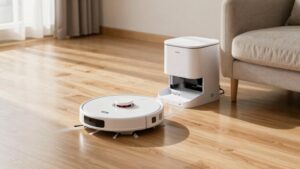
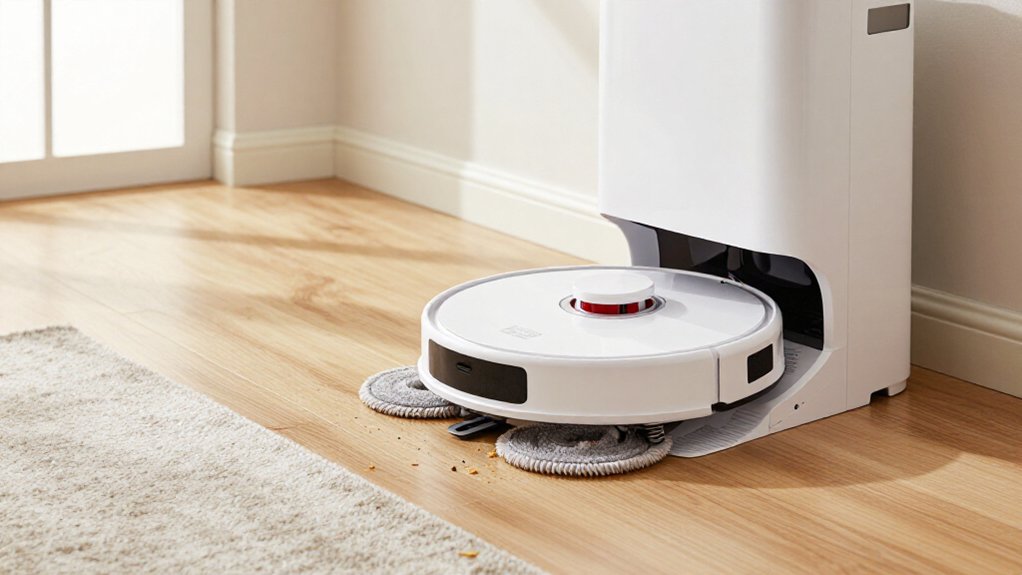
After setting realistic mopping expectations, check whether your home can accommodate the dock’s full clearance envelope, not just its footprint. Measure the required base width, depth, and open approach space recommended by the manufacturer so the robot can align and dock reliably.
If you have sideboards, narrow hallways, or low cabinets, verify the dock’s height and width won’t obstruct its approach. For tall bases, such as the Roborock Qrevo QV 35A, check vertical clearance beneath shelves, trim, or TV consoles.
Keep chargers, cords, and wall vents away from the docking zone; nearby geometry can confuse LiDAR and other sensors. After installation, run repeated docking tests from scheduled cleaning cycles. If the robot misses alignment, stalls, or needs repositioning, move the dock before relying on automation.
Check Brush Roll Access
Check how quickly you can remove the main brush before buying, since hair and debris will eventually wrap around it. Prefer a tool-free cover or slide-out cassette: you’ll clean it faster and reduce downtime. Weekly cleaning suits pet households, while heavy traffic may require more frequent attention.
| Access design | What it means |
|---|---|
| Snap-release | Fastest routine cleaning; no screwdriver needed. |
| Screw plate or belly pan | Slower disassembly; check replacement compatibility. |
Inspect the roller, too. Rubber or zero-tangle designs handle long hair better; bristle hybrids generally agitate carpets more effectively. Confirm the model-specific roller and OEM part number, because universal replacements are uncommon. Replacement rolls typically cost $10–$60 and last six to 18 months. Clear bearings and gears before debris damages the drive system or motor.
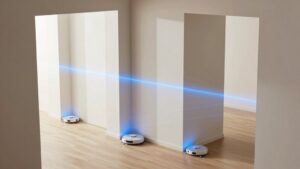
When you compare navigation systems, you’ll find that LiDAR generally creates more accurate maps and consistent coverage, while camera-based VSLAM can miss spots and depends more on visual landmarks.
Consider LiDAR for cluttered homes and reliable obstacle detection, but note that cameras may struggle in dim lighting. You should also review privacy policies, since camera systems and cloud-connected mapping can increase concerns about image and map data.
Mapping Accuracy Compared
For the most reliable room layouts and repeat cleaning, LiDAR navigation is generally the stronger choice than camera-based systems because its laser mapping doesn’t depend as heavily on ambient light. You’ll typically get consistent routes in dim rooms, while camera navigation can lose visibility and miss areas. VSLAM systems depend on visual features, and reflections or surroundings can introduce mapping inconsistencies. Basic gyroscope navigation may create inefficient patterns rather than a room map.
Mapping accuracy matters when you mop mixed floors. A stable map helps you assign rooms, schedule runs, and create no-go zones around rugs and *changes*. Before buying, check whether reviews confirm first-run mapping, repeatable room recognition, and map retention. If you mop in dim rooms, LiDAR offers the better choice.
Obstacle Detection Differences
Because LiDAR measures surroundings with lasers rather than relying mainly on visible details, it generally detects furniture, pet bowls, and other obstacles more consistently than camera-only navigation, especially in dim rooms. LiDAR-equipped models typically build repeatable maps and manage chair legs, cables, and bowls more reliably during scheduled cleaning. Camera-based systems, often marketed as AI vision, can identify objects well when lighting and visibility cooperate, but they may miss or misclassify small hazards.
Your choice should reflect your floor plan. Better detection prevents bumps, entanglements, and failed mop-pad lifting at hardwood-to-carpet junctions, reducing wet-pad dragging and streaks. During the first week, map your home, then test thin cords, socks, and small toys. Verify consistent avoidance before scheduling unattended cleaning in your busiest rooms.
Low-Light Performance
LiDAR navigation generally maintains accurate maps and planned routes in low light because it measures distance with lasers rather than relying on visible details. You’ll usually get stable room mapping and efficient movement at night, making LiDAR especially valuable in multi-room homes that repeat scheduled routes.
Basic gyroscope or VSLAM systems can become less efficient and leave coverage gaps when illumination falls.
Camera-based navigation depends on visible features, so dim rooms, changing light, glare, shadows, and busy flooring can disrupt localization. If you run cleaning routines in dark hallways or with limited overhead lighting, prioritize LiDAR, or choose a hybrid model that combines LiDAR with a camera.
Check tests for nighttime coverage, map recovery, and route consistency; daytime performance alone doesn’t guarantee low-light reliability.
Privacy Considerations
The sensor that keeps a robot on course at night also affects what it may collect inside your home. LiDAR generally builds maps from point clouds rather than identifying people, so it can limit exposure to visual household details. It also navigates consistently in darkness.
Camera-based systems capture visual data for recognition and obstacle avoidance, creating additional privacy considerations and potentially weaker low-light performance.
Before buying, check whether you can disable video or AI processing, restrict app permissions, and choose local-only processing. Review the manufacturer’s policy for retaining or sharing maps, navigation logs, and images; either sensor type may send data through the app or cloud.
If privacy matters most, prioritize LiDAR with local obstacle detection, then verify storage settings, encryption claims, and firmware support.
HEPA Filtration for Allergies
If you have allergies, choose a robot vacuum with a sealed, true HEPA filtration stage that captures fine dust and pet dander. A HEPA-sealed self-emptying base can further limit allergen release during bin emptying, but clogged brushes or filters can reduce capture performance.
Check whether you can wash the filter or must replace it, and confirm that accessing and maintaining it is simple.
True HEPA Filtration
True HEPA filtration can help capture fine allergens such as dust and pet dander instead of recirculating them through your home, but manufacturers’ labels don’t always use the term consistently.
Check the manual and product specifications for “True HEPA,” rather than vague phrases such as “HEPA-like” or “HEPA media.” The filter should sit in the robot’s internal air path or dock, where it can treat exhaust and collected dust. If you’re allergy-sensitive, a HEPA-sealed, bagged base offers an additional containment advantage during disposal.
Confirm whether the filter is washable or replaceable: washable designs still may require replacement, commonly every six to 12 months depending on use. Also assess the dust-collection system, including bag capacity and stated self-empty intervals, such as 45 or 60–68 days. A filter claim means less if the dock releases dust while emptying, so prioritize sealed handling and readily available replacement filters for convenient long-term maintenance and cleaner disposal at home.
Allergen Capture Performance
For allergy sufferers, effective filtration depends on more than a “HEPA” label: look for a robot with true HEPA filtration and, ideally, a sealed HEPA dock that captures fine dust during self-emptying. Check whether the dust bag is HEPA-sealed or micron-filtered. A self-emptying dock can also limit exposure compared with opening an onboard bin frequently.
Read the manual to confirm the filter’s type and care requirements. Washable filters may need cleaning, while tap-only filters shouldn’t be rinsed; either way, a clogged filter restricts airflow and can reduce real-world particle capture. Check replacement intervals and availability, too.
Some Roborock models recommend replacing filters about every six to 12 months, depending on use. Consistent maintenance helps your robot keep capturing particles that can worsen allergy symptoms.
Sealed Filtration Systems
A sealed HEPA filtration system helps keep fine allergens contained by filtering air around the dustbin and through the robot’s exhaust path, rather than relying on a loosely fitted filter alone. For allergy-prone homes, look for explicit claims such as “HEPA-sealed” or “dust-tight,” not vague “allergen” wording.
The filter rating should identify HEPA, and the sealed design should cover both the bin and exhaust path so captured particles don’t re-enter your room. Pair this system with a self-emptying dock that uses sealed bags or a closed tray; it can reduce the dust cloud released during docking.
Confirm the manufacturer’s specifications, because clear containment details matter when you or someone in your household has allergies and wants less airborne exposure throughout your home’s cleaning routine.
Filter Cleaning And Replacement
Sealed construction limits fine-dust leakage, but the HEPA filter still needs regular cleaning and replacement to maintain airflow and allergen capture. For allergy-focused cleaning, choose a robot with a sealed HEPA base and dust path, especially if its dock markets HEPA-sealed emptying. This design helps contain fine particles when the robot docks, but it doesn’t eliminate maintenance.
Check whether the filter is washable or tap-only. Wash washable filters only as directed, and replace tap-only designs according to the manual; never reinstall a damp filter. Easy access encourages regular cleaning, while hair and dust buildup restricts airflow and reduces capture.
Plan to replace the filter every 6–12 months, depending on usage, pets, and dust. Compare upkeep with self-emptying frequency, and confirm replacements are available and affordable.
Verify Threshold-Crossing Height
Measure your highest doorway, tile-to-carpet, and raised-floor passage in millimeters before choosing a robot vacuum-mop. Compare that measurement with the robot’s stated or tested threshold-crossing height; many models manage 10–20 mm, but surfaces and wheel design matter. Don’t rely on navigation claims alone: look for testing that confirms movement across uneven vinyl, hardwood, and carpet transitions without stalling.
If you have rugs or low-pile carpet beside hard flooring, confirm that the mop pad lifts when carpet detection triggers. A damp pad can drag, stick, or leave streaks, especially on deeper pile. During the week, schedule a route that repeatedly crosses your transition. Watch for scraping, wheel spin, recovery, or incomplete crossing, then adjust no-go zones if the robot can’t clear it reliably.
Price Pads and Filters
Before you compare robot vacuum-mop prices, calculate the ongoing cost of filters, mop pads, dust bags, and cleaning supplies. Check whether the robot uses washable, tap-only filters or replaceable filters, often every six to 12 months. A washable filter saves money, but you can’t neglect cleaning it; a clogged filter can weaken suction despite impressive initial pascal ratings. HEPA filtration only delivers value when you maintain it properly.
Compare mop pad costs and expected lifespan. Some pads last about one year, while basic reusable designs may need earlier replacement if they retain odor. Premium docks wash pads with hot water, around 167°F, and dry them, reducing odor and hands-on work. Assess dust containers and bags: capacities rated for 45–60 days can make maintenance intervals realistic.
Check Replacement-Parts Availability
Check that the robot’s brushes, filters, and mop pads are easily accessible in your region before you buy. Confirm the main brush removes without tools and its end caps open, so you can clear wrapped hair quickly. Hair often causes the biggest performance losses, especially with pets.
1. Check regional listings for replacement brushes and filters, then compare prices and delivery times.
Filters may need replacement every six to twelve months, depending on use, even when washable.
2. Ensure compatible mop pads stay stocked, and identify any dock consumables you must restock.
3. Choose specified brush, filter, and pad models; avoid vague compatibility claims.
Self-cleaning docks still require tray cleaning and hygienic tank care. Read the service documentation, and favor anti-tangle designs if you have shedding pets.
Confirm App Scheduling Controls
Once you’ve confirmed that replacement parts are available, verify that the app gives you independent control over cleaning modes and schedules. Don’t settle for a combined routine: you should be able to schedule vacuum-only, vacuum-and-mop, and mop-only runs, then choose daily or weekly mopping.
Check controls before buying:
- Assign rooms or zones to routines, such as a daily kitchen mop and bedroom vacuum-only schedule. This prevents unnecessary wet cleaning on mixed surfaces.
- Confirm adjustable water output and drying behavior, especially if the dock washes or air-dries pads. Test whether mop-only mode starts without an automatic vacuum cycle.
- Run a scheduled job and verify it persists, triggers, and fits the dock’s maintenance routine. You’ll need weekly pad and dock upkeep even with automation.
Conclusion
Before you buy, match the robot’s abilities to your home, not its feature list. Confirm that its mop fits your floors, dock, thresholds, and cleaning routine. Check brush access, navigation, filtration, app scheduling, and the ongoing cost of pads, filters, and other parts.
Read availability and warranty details, too. If a model clears these practical tests, you’ll spend less time troubleshooting and more time enjoying consistently cleaner floors throughout your home each day with confidence.