Robot Vacuum Settings for Carpet and Area Rugs
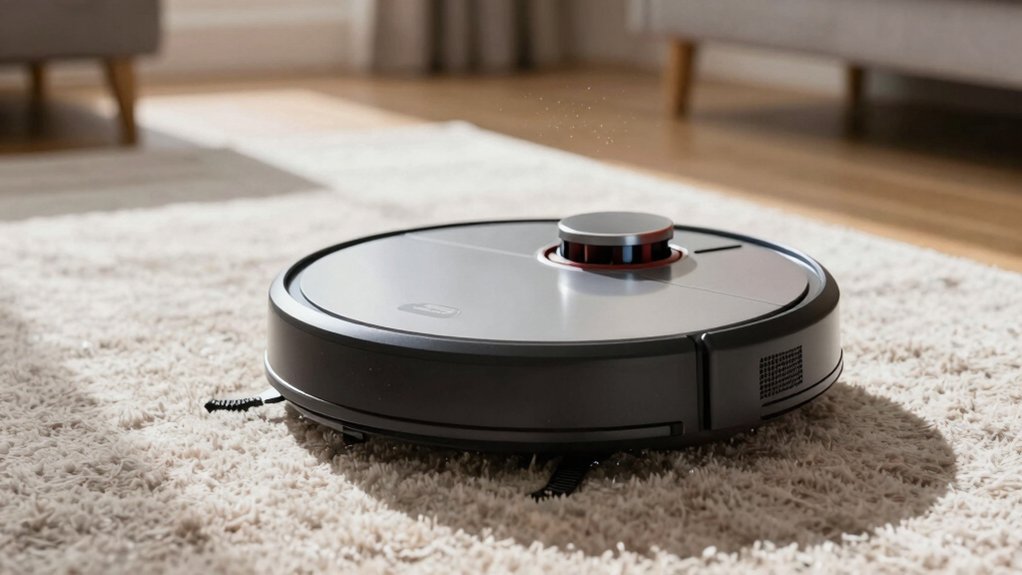
Use Carpet Boost or Max/Max+ so your robot raises suction automatically on rugs and dense fibers. Enable Multi‑Pass or Deep Clean for plush areas to increase overlap and agitation. Then run a short Edge Clean afterward to capture perimeter debris.
Map rug zones and set no‑go areas along fringes and thresholds to avoid tangles. Turn Mop‑Lift or Carpet Avoidance on for hybrid cleans so mops stay off high‑pile. Keep presets and a “Carpet Day” routine for best results. More tips follow.
Quick Overview
- Enable carpet boost (or Max/Max+) so the robot raises suction automatically over carpets and dense rugs.
- Create per-room presets or a “Carpet Day” routine using higher suction and multi-pass for rug-rich rooms.
- Use map zones and no-go lines to protect fringes, tassels, cords; this will also prevent the robot from climbing delicate rugs.
- Turn on Mop Lift/Carpet Avoidance or set mop-on-carpet to Off to keep mop plates raised at carpet edges.
- Schedule a post-clean Edge Clean. Use tangle-resistant rollers or fringe no-go zones to reduce jams.
Quick-Start Robot Vacuum Settings for Carpets (Carpet Boost, Max Suction, Multi-Pass)
Want your robot to actually dig into carpet fibers instead of just gliding over them? Enable carpet boost so the unit automatically raises suction when it detects carpet, improving pickup of embedded debris without manual intervention. For dense or plush fibers, switch to max suction (or Max+) during room or zone cleans to maximize particle lift. Expect higher noise and shorter run time.
Activate Multi-Pass or Deep Clean in high-pile zones to increase overlap and agitation. This dislodges deeper dirt the initial pass misses. After the main cleaning, run an Edge Clean to capture debris along rug perimeters and furniture edges that the central brushes can miss.
Save per-room routines that combine carpet boost with targeted max suction and multi-pass for consistent, repeatable maintenance. This way, you don’t have to reconfigure settings each session. These steps give you a concise, technical workflow for improving carpet cleaning performance without extra effort.
Set Map Zones and No-Go Areas for Rugs, Fringes and Thresholds
After you’ve set carpet boost, max suction, and multi-pass for thick rugs, map-based zoning lets you apply those settings only where they’re needed and keep the robot away from problem areas. Use map zones to mark high-pile rugs so the robot applies higher suction and avoids hard floors that don’t need boost.
Create no go areas around fringes, tassels, and cables to prevent tangles and brush jams. Place no go areas at thresholds or rug transitions where the vacuum struggles to climb or misnavigates.
- Define map zones for each rug-rich room and save them so the robot runs targeted routines automatically every mapping session.
- Draw small no go areas along rug edges, fringe lines, and near cords; test one run and refine boundaries if the robot still snags.
- After adding or moving rugs, remap or edit existing zones immediately to maintain accurate routing and consistent cleaning performance.
Save “Carpet Day” Routines : Sample Schedules and Per-Room Presets
How often should your robot target carpets? Create a dedicated “Carpet Day” routine that runs 2 to 3 times per week, using high-suction and multi-pass cleaning for carpeted rooms only. For reliable carpet scheduling, set the routine to skip hard floors and spots. Include a final edge-clean pass to pick up perimeters.
Save per room presets so living areas and dense rugs use Carpet Boost or Max/Max+ suction while non-carpet zones remain on Standard. Use two-pass or deep-clean options in high-pile zones to increase agitation and dislodge debris. Repeat the same room if needed.
On Roborock, save this as a Custom Routine; on Ecovacs, save it as a Scheduled Task for quick recurring maintenance. Test timings so the robot runs when rooms are empty. Adjust frequency based on observed soil levels. These steps keep rugs fresh without over-cleaning hard floors.
Protect High-Pile Carpets When Mopping (Mop-Lift & Carpet Avoidance)
Why risk dampening your high-pile rugs when your robot can keep them dry? Enable Mop Lift and set Mop on Carpet to Off so the mop plate raises at carpet boundaries: this maximizes mop lift efficacy and prevents moisture transfer into plush fibers.
Combine that with Carpet Avoidance to stop the mop contacting high-pile areas during hybrid clean cycles.
- Configure per-room settings: assign Carpet Avoidance to carpeted rooms and allow mopping only on hard floors, mirroring Roborock/Ecovacs capabilities.
- Verify Mop Lift behavior: test a transition so the mop raises automatically and the robot vacuums uninterrupted over thick rugs, preserving texture and preventing fiber damage.
- Use zone pairing: create mop zones adjacent to avoidance zones to maintain cleaning coverage without wetting high-pile areas; this keeps suction continuous while the mop is isolated.
These steps give you reliable Mop lift efficacy and precise Carpet avoidance. They protect high-pile carpets while maintaining overall cleaning performance.
Troubleshooting Carpets: Edges, Tangles, Poor Pickup and Short Runtime
Once you’ve locked in mop-lift and carpet avoidance settings to keep high-pile rugs dry, you’ll want to resolve the remaining carpet issues that affect cleaning quality: debris trapped along edges, brush tangles from fringes and hair, poor pickup on thick pile, and shortened runtime during high-suction cycles.
Start by scheduling a targeted post-main pass edge clean to recover edge debris along skirting boards, furniture perimeters, and rug borders. Use fringe protection: either no-go zones or temporary tape/weights to stop tassels from wrapping brushes. Fit tangle-resistant or comb-style rollers and clear visible hair or strings before runs to reduce jams.
For thick/high-pile carpets, enable Carpet Boost or Max suction and set a multi-pass deep-clean pattern to lift embedded dust. If high-suction cycles cut runtime, save per-room routines with short Max cycles and alternate them with lighter whole-home runs to balance battery load.
Monitor results and tweak zone timing, suction, and brush types until pickup and runtime meet expectations.
Frequently Asked Questions
Can a Robot Vacuum Chew up Long Fringe or Tassels?
Yes, your robot vacuum can chew up long fringe or tassels if they get pulled into brushes or intake. You’ll want to prevent fringe snagging and tassel damage by securing loose ends, using no-go zones, or removing rugs temporarily.
Choose models with brush-off modes or gentle suction settings. Inspect fringe regularly. If you see wear, stop cleaning and adjust settings or remove the rug to avoid costly damage.
Will HEPA Filters Help With Carpet Allergen Removal?
Yes, HEPA filters help reduce carpet allergens by trapping fine particles like dust mite waste, pet dander, and pollen that vacuums can pull from fibers.
You’ll still need proper agitation and suction to dislodge embedded allergens; HEPA only captures what’s airborne or reaches the filter. For best results, vacuum regularly, use a high-efficiency brushroll, seal dust pathways, and replace HEPA filters per manufacturer recommendations to maintain filtration performance.
Can I Use Robot Vacuums on Wool or Oriental Rugs?
Yes, you can use many robot vacuums on wool or oriental rugs, but you’ll need to check rug material compatibility and robot vacuum durability first.
You’ll want models with adjustable suction, soft-bristle brushes, and lift sensors to avoid edge damage. Test on a small area, use low settings, and avoid aggressive brushes or high suction that can pull fibers or fringe.
Maintain frequent manual care and inspect regularly.
How Often Should Brushes and Rollers Be Replaced on Rugs?
You should replace brushes and rollers every 6–12 months depending on use and visible brush wear. High-traffic rugs or pet hair shorten life. Check monthly for frayed bristles, packed fibers, or wobble. Perform roller replacement when rotation is impaired or bearings sound noisy.
Keep spare parts, clean components after each use, and log replacements. This minimizes damage to delicate fibers and maintains consistent suction and agitation performance.
Do Robot Vacuums Cause Color Fading on Area Rugs?
Unlikely, robot vacuums rarely cause significant color fading if you use them correctly. You’ll prevent abrasion and UV-related fading by choosing gentle suction, soft brushes, and avoiding long runs on delicate dyes.
Check pile and dye stability first; test a small area. Also, watch for fringe snagging by using boundary strips or turning off edge-clean modes. Regular maintenance and proper settings keep colors intact and reduce wear.
Conclusion
You’ve got the settings and routines to keep carpets and area rugs clean without risking fringes or high-pile damage. Use carpet-boost and multi-pass for deep cleaning; set no-go zones and map-based rug areas. Save per-room “Carpet Day” schedules.
Enable mop-lift and carpet avoidance when mopping. If you run into edges, tangles, or short runtime, follow the troubleshooting steps and adjust suction, brushes, or mapping. You’ll get consistent, safe results.