Robot Vacuum Filter Cleaning and Replacement Schedule
You should check and clean your robot vacuum filter about once a week. Tap or brush loose debris; rinse washable filters with lukewarm water (no soap) and air-dry completely for at least 24 hours before reinstalling.
Replace disposable or HEPA filters every 3–6 months; do this sooner if you have pets, heavy dust, or reduced suction. Watch for odors, tears, or higher energy use as replacement signs. Keep spares on hand and continue for detailed cleaning, drying, and replacement tips.
Quick Overview
- Check and clean filters weekly; increase to 2–3 times weekly for pets or dusty homes.
- Rinse washable filters under lukewarm water. Air-dry completely (24+ hours) before reinstalling.
- Use a soft brush or compressed air on non-washable/HEPA filters. Do not wash them.
- Replace disposable/non-washable filters every 3–6 months. With pets or heavy use, replace every 1–3 months.
- Watch for reduced suction, odors, or shorter runtimes as immediate signals to clean or replace filters.
How to Clean Your Robot Vacuum Filter : Step‑by‑Step
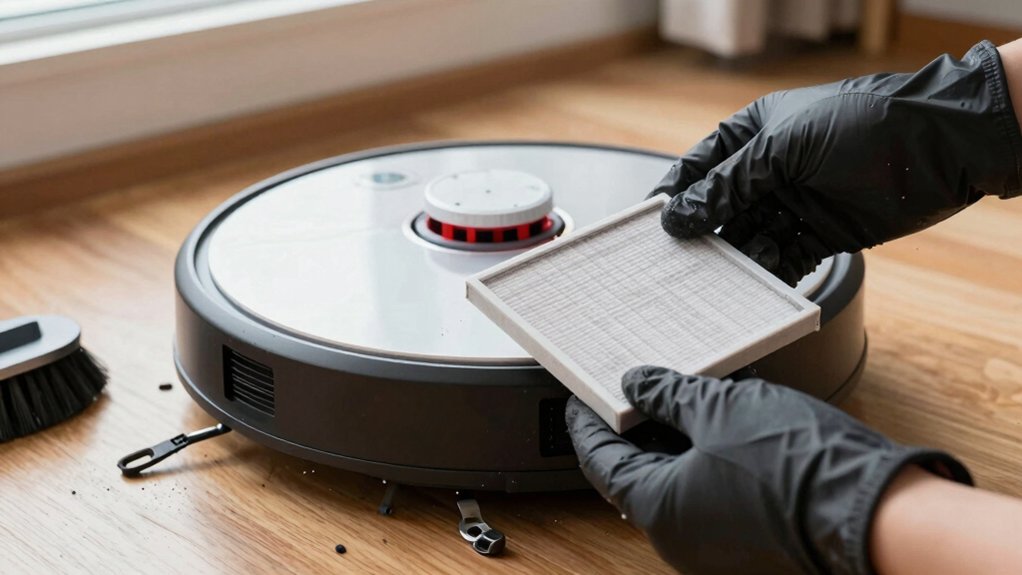
Wondering how to keep your robot vacuum running at peak suction? Turn it off and unplug it. Then remove the dustbin to access the filter. Tap the filter outside to loosen dust, brush gently with a soft brush, and check for holes or thinning material.
If the filter’s washable, rinse under lukewarm water: no soap. Air-dry fully for at least 24 hours before reinserting. If it’s non-washable, don’t wash it; use a soft brush or compressed air to remove debris. Replace the filter when cleaning no longer restores performance.
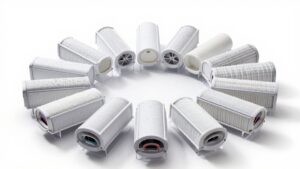
Keep a spare filter on hand for quick replacement so you’re not sidelined during cleaning. Think of it like carrying an extra battery for uninterrupted use. Follow model-specific guidance: HEPA or high-efficiency filters may be replace-only and typically need swapping every 3–6 months depending on use.
Also, tidy cord management around your charging base and storage area to prevent damage while you service the unit.
Quick Schedule: How Often to Check and Clean Filters
Now that you know how to clean a filter, set a quick routine: check filters about once a week and clean them more often, 2–3 times weekly, if you have pets, allergies, or a dusty home. You’ll use this cadence to catch clogged or damaged filters early and keep suction steady. Track hours in your app and note model guidance for replacement intervals, commonly 3–6 months or ~120 hours. Use two word idea 1 as a mental tag for checks; use two word idea 2 to remind you when to replace.
Follow these practical steps:
- Inspect filter weekly for visible debris and damage.
- Clean washable filters and let them fully air-dry before reinstalling.
- Brush non-washable filters gently; replace if performance doesn’t recover.
- Set app reminders or calendar alerts for 3–6 month replacements.
- Increase cleaning frequency in pet/allergy/dust-heavy environments (2–3× weekly).
This routine minimizes performance loss and extends filter life without extra fuss.
How to Clean Washable Filters Safely
Anyone with a washable robot vacuum filter should rinse it under lukewarm running water until the water runs clear. Avoid soaps or harsh chemicals. Air-dry it completely—typically at least 24 hours—before reinstalling to prevent mold, odors, or damage.
After rinsing, shake gently to remove excess water and set the washable filters on a clean, dry surface in a well-ventilated area. Don’t use direct heat or sunlight; those can warp frames or degrade media. Monitor drying time; most filters need a full day or longer depending on humidity.
Only reinstall when the filter feels bone dry to the touch. Any residual moisture risks mold growth and odors. If the filter still smells or shows visible deterioration after washing, replace it rather than reusing to keep suction and air quality optimal.
Remember: this routine applies to washable filters only. Do not wash HEPA or non-washable filters, as water will damage them.
When to Replace Non‑Washable and HEPA Filters (Signs to Watch)
At some point, you’ll need to replace non‑washable and HEPA filters rather than keep cleaning them. This typically occurs every 3–6 months for disposable filters and anywhere from six months up to a few years for HEPA depending on use and environment. Check manufacturer guidance for specific replacement timing and note filter material differences: disposable non‑washable media fails faster than durable HEPA fibers. Improper washing can damage HEPA performance.
Replace filters when you observe clear signs rather than guessing. These signs include:
- Loss of suction that doesn’t improve after cleaning or reseating the filter
- Visible dirt buildup, discoloration, or physical deterioration of the filter material
- Persistent unusual odors coming from the vacuum after running
- Tears, holes, or deformed edges that let debris bypass the media
- Washable filters that won’t restore performance after thorough cleaning
Prioritize replacement over repeated cleaning when performance drops. Always follow model-specific instructions to avoid compromising filtration.
How Pets, Air Quality, and Usage Change Replacement Timing
How often should you replace filters when you have pets or live in a dusty area? If you have shedding pets or high pollution, expect a shorter interval than the typical 3–6 months: swap non-washable and HEPA filters closer to every 1–3 months. Pet impact is the main driver. Hair and dander clog filters fast and reduce suction and airflow.
Monitor filters visually and follow app or maintenance reminders to adapt timing. Factor usage variability: homes with daily runs, multiple pets, or heavy foot traffic need more frequent replacement than occasional use. Maintain a cleaning cadence (weekly to biweekly) to extend filter life. However, don’t let cleaning substitute for replacement when airflow is restricted.
Prioritize HEPA replacements if allergies matter. Use app alerts plus your nose and performance checks to decide sooner rather than later.
Troubleshooting: Loss of Suction, Odors, and Filter Alerts
Why is your robot losing suction or smelling off? Check the filter first: loss of suction despite a clear nozzle and bin usually means the filter’s clogged, so you’ll need to clean or replace it. Odors often indicate moisture, mold, or bacterial buildup. Replace non-washable filters promptly. Watch app alerts and indicator lights for reduced airflow; those are timely prompts to act.
Inspect the filter for visible dirt buildup or heavy soiling and clean or swap it out. If the filter is damp or smells musty, replace it to eliminate odors and prevent mold spread.
Follow regular maintenance: check filters after cleaning cycles and replace non-washable types every 3–6 months. Respond to companion app filter alerts immediately; reduced airflow affects performance and can signal impending failure.
Keep a simple replacement log so you don’t exceed recommended intervals and avoid recurring loss of suction or persistent odors.
Where to Buy Genuine Robot Vacuum Filters and Compatible Replacements
Looking for authentic replacement filters? You can buy genuine replacements directly from the iRobot Store: Parts and Accessories or through authorized retailers to guarantee fit and performance for Roomba 400–900 Series models. If you’re outside North America, use Global.iRobot.com to locate regional buying options and confirm part compatibility.
When choosing filters, match the part number to your model. iRobot stresses correct fit to maintain suction and air quality. Buying options include single filters, multi-packs, and official accessory bundles. Weigh cost-per-filter and frequency needs; common guidance suggests replacing every 3–6 months, with more frequent replacements for heavy use or pets. Avoid generic listings that don’t specify your Roomba model.
If you’re unsure which part to order or can’t find stock, contact iRobot Customer Care for model-specific recommendations and availability. That ensures you get authentic parts that preserve performance and reduce the risk of using incompatible replacements.
Simple Maintenance Checklist to Keep Suction and Air Quality Optimal
Because regular upkeep keeps suction strong and air clean, follow a short maintenance checklist you can do weekly to quarterly to prevent performance drops. You’ll spot issues early by tracking suction, odors, and visible dirt. Reduced suction and odd smells signal cleaning or replacement.
Wash foam pre-filters weekly or as needed; replace non-washable and HEPA filters every 3–6 months per your model’s manual or app. Use eco-friendly materials for wipes and disposal where possible, and handle filters gently to preserve seals that affect noise reduction and efficiency.
Check energy use and runtime: shorter runs can mean a clogged filter. Keep spare genuine or compatible filters on hand so you don’t skip replacements.
- Empty dust bin and inspect pre-filter for washable foam or wear.
- Clean or replace HEPA/non-washable filters on a 3–6 month cycle.
- Rinse and fully dry reusable filters before reinstalling.
- Note reduced suction, odors, or higher energy draw as prompts.
- Store replacements and use eco-friendly materials for safe disposal.
Frequently Asked Questions
Can I Run My Robot Without a Filter in Emergencies?
You can run it briefly in an emergency, but do not make it routine. Emergency operation without a filter can let dust and debris reach the motor and sensors; this increases the risk for damage and reduced suction.
You should monitor performance, avoid fine dust or liquids, and vacuum only for short intervals. Replace or reinstall the proper filter as soon as possible to protect the unit and maintain air quality.
Are Aftermarket HEPA Claims Reliable for All Models?
Not always. Aftermarket HEPA filters vary in quality and model compatibility, so you’ll want to verify fit, dimensions, and filtration ratings for your specific vacuum.
Check manufacturer specs, third-party test results, and user reviews for your model to confirm particle capture and airflow won’t suffer. Cheap substitutes can reduce suction or leak dust. When in doubt, choose reputable brands or OEM filters to ensure reliable performance and proper sealing.
How Should I Store Spare Filters Long-Term?
Store spare filters in airtight bags or sealed containers to keep out dust and moisture. You’ll want long term storage conditions that are cool, dry, and stable. Avoid attics, basements, or direct sunlight.
Add a silica packet for humidity control and label each package with purchase or expiration dates. Rotate stock so older filters get used first. Do not compress or bend filters; keep them flat and protected.
Do Filters Affect My Robot’s Warranty?
Yes, filters can affect your robot’s warranty if you use non-approved parts or neglect the replacement schedule. You should follow the manufacturer’s filters warranty terms, use authorized filters, and keep records of replacements.
If damage arises from improper filter use or failure to follow the replacement schedule, warranty claims may be denied. Replace and store filters as recommended to protect performance and maintain valid warranty coverage.
Can I Vacuum a Used HEPA Filter Before Replacing?
You can gently vacuum a used HEPA filter to remove surface dust, but you shouldn’t expect a full restore. Deep clogged fibers and trapped allergens remain. Use low suction and a brush attachment. Then monitor replacement timing based on performance and manufacturer guidance.
If suction, runtime, or air quality drops, replace the filter. Regular cleaning can extend life slightly; however, timely replacement ensures filtration and preserves your vacuum’s effectiveness.
Conclusion
Keep your robot vacuum’s filters clean and replaced on schedule to maintain suction, air quality, and lifespan. Check filters weekly, wash washable types gently, and let them dry completely. Replace non‑washable or HEPA filters when they show wear, odors, or reduced performance. Replace them sooner if you have pets or poor air quality.
Follow manufacturer guidance; use genuine or compatible replacements. Follow the simple maintenance checklist to prevent clogs, alerts, and costly repairs.