Robot Vacuum Dustbin Cleaning and Odor Control
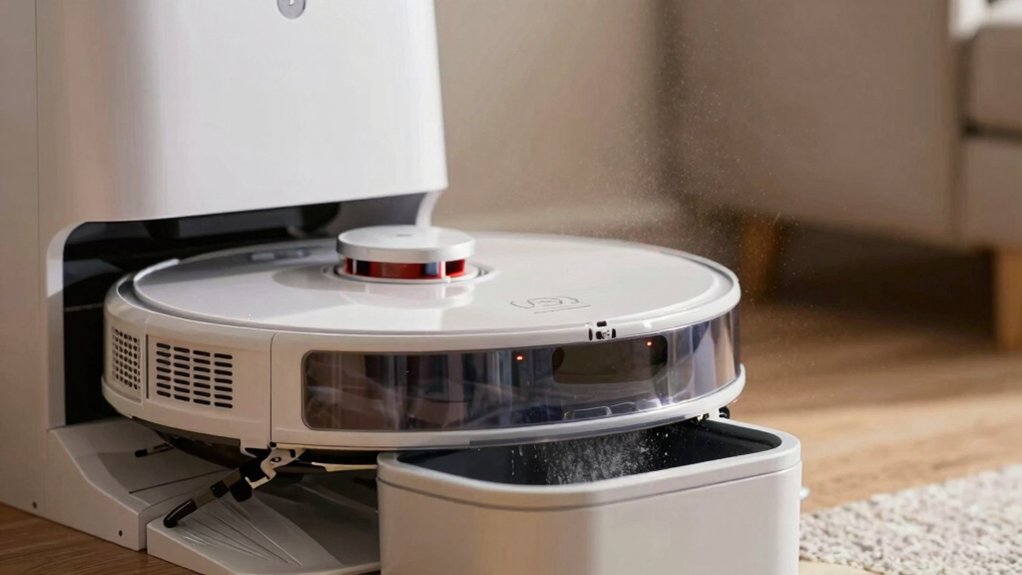
You should empty your robot vacuum’s dustbin after every few runs; more often with pets or allergies to maintain suction and stop odors. Pull the bin straight out, dump contents, remove and rinse the removable filter and housing under cold water, then let everything air-dry fully before reinserting.
Don’t use hot water, bleach, vinegar, or dishwashers. Wipe bin sensors dry to avoid false “full” alerts. Follow a short schedule and simple checks below to learn more.
Quick Overview
- Empty the dustbin after each run or when the bin indicator shows full to prevent odor buildup and maintain suction.
- Remove and rinse the dustbin housing and removable filter under cold water. Then let all parts air-dry completely before reassembly.
- Use a soft brush or cloth to remove stuck-on debris from the bin, beater brush, end caps, and interior pathways.
- After rinsing, shake off excess water. Pat with a lint-free cloth, and fully air or warm-air dry (≈104°F/40°C) if supported.
- Wipe the bin sensor dry to avoid false “full” alerts. Inspect and clean brush areas where trapped hair can cause smells.
How to Empty a Robot Vacuum Dustbin (Quick Steps)
When you’re ready to empty the dustbin, open the lid and pull the bin straight up and out. Then dump the contents into a trash can. Next, remove the filter from its housing so you can clean both parts. You’ll then rinse the housing and removable filter under running cold water, avoiding soaps or harsh chemicals. Let both fully dry before reassembly.
While the bin’s out, inspect and clean the beater brush, end caps, and interior pathways to remove hair and debris that reduce airflow. Use a comb or brush tool to dislodge tangles. Wipe interior surfaces with a dry cloth. Reinsert the filter by aligning its tabs with the housing protrusions; then press flush to reseal the dustbin.
Follow this quick routine after each major run to maintain suction and prevent odors. For routine checks, note two word discussion idea1 and two word discussion idea2 as prompts for scheduling and troubleshooting.
How to Deep-Clean the Dustbin, Filter & Housing
You’ve already handled quick emptying; now take a deeper approach to stop odors and restore peak suction. For effective dustbin maintenance, remove the dustbin and separate the filter and any removable liners. Rinse the housing and filter under running cold water only. Hot water or the dishwasher can warp parts and damage seals. Use a soft brush or cloth to dislodge stuck-on dirt. Avoid transferring debris by cleaning the beater brush, underside, end caps, and side brushes separately.
After washing, air-dry every component completely. Reinsert parts only when fully dry to prevent mold and moisture-related odors. Drying is critical for odor prevention and to maintain filter efficiency. Reassemble once dry and check seals for proper fit. Schedule this deep clean regularly depending on use: heavy use monthly, light use every 2–3 months. These steps preserve suction performance, extend component life, and reduce the chance of persistent smells in your robot vacuum.
How to Dry the Bin, Prevent Odors & Choose Safe Cleaners
How long you let the bin and filters dry determines whether moisture turns into mold and odors. Therefore, dry everything completely before reinserting. Establish a drying routine: After rinsing, shake excess water, pat with a lint-free cloth, then air-dry the dustbin and housing fully in a ventilated, dry area. If your model supports warm air drying, use about 104°F (40°C) to speed removal without stressing seals.
For odor prevention, avoid hot water, dishwashers, bleach, and vinegar; they can warp plastics and damage seals, making odors worse. If smells persist, check the 2.5L internal dust bag and filters. Clean per manufacturer guidance or replace them: fresh filtration reduces odor sources. Do not skip complete drying: residual moisture is the primary driver of mold and persistent smells.
Keep a simple checklist: rinse → remove excess water → warm-air or air-dry → inspect/replace bag and filter → store dry. That drying routine minimizes mold, protects components, and maintains odor prevention.
Cleaning Schedules by Use Case (Pets, Allergies, Light Use)
Need a strict schedule? For pet owners, adopt a pets schedule of emptying the dustbin 2–3 times per week in high-use homes to control hair, dander, and odor. Use Narwal Flow’s 2.5L internal dust bag and its compression feature to reduce how often you must fully empty between cleanings.
For allergy sufferers, follow an allergies schedule: clear the bin after each run or immediately when the bin indicator shows full to preserve suction, filtration, and lower allergen exposure. In light-use homes, empty after each session and rinse with cold or lukewarm water; air-dry completely before reinserting to prevent moisture-related odors.
Across all cases, leverage app alerts to align cleaning, filter checks, and sensor maintenance with actual use. This keeps performance consistent without guesswork. When possible, use warm-air drying to eliminate residual moisture and minimize mold or odor formation before you return the bin to the robot.
Troubleshooting: False “Bin Full,” Sensor Issues & Smells
After following a cleaning schedule, you’ll still sometimes see a false “bin full” alert or detect smells; both are often sensor or moisture-related rather than true capacity issues. First, remove the dustbin and wipe the sensor with a clean, dry cloth. Dust or hair commonly blocks the sensor and resets readings. If the alert persists, check and clear the filter and suction path for clogs that mimic fullness. Some models also need a quick reset in the app or robot settings to clear the notification.
Odor detection problems usually come from moisture and debris buildup. Rinse the bin, dry it thoroughly, and inspect the beater brush area for trapped hair that holds moisture. For ongoing prevention, perform regular sensor maintenance: wipe side sensors with a damp paper towel and dry them completely.
These steps reduce false alerts, improve odor detection accuracy, and keep your robot running reliably.
Frequently Asked Questions
Can I Run the Bin Through the Dishwasher?
You can sometimes run the bin through the dishwasher, but check dishwasher safety and material compatibility first. Consult the manual for temperature limits and for removable parts labeled dishwasher-safe.
Plastic bins made from dishwasher-grade plastics usually tolerate lower racks; rubber seals, filters, and electronics will not. If unsure, hand-wash with mild detergent and warm water to avoid warping or odor traps. Testing one cycle on low heat minimizes risk.
Are Disposable Dustbin Liners Worth Using?
Yes, disposable dustbin liners can be worth using. You’ll boost disposal efficiency by making emptying quicker and cleaner. This method can cut airborne dust by 60–80% in practical setups.
Liners also provide basic odor masking; however, they don’t eliminate smells entirely. Consider scented or charcoal options for better control. You’ll spend more on supplies and waste, so weigh convenience and hygiene gains against ongoing cost and environmental impact.
How Do I Store a Spare Filter Properly?
Store spare filters in a cool, dry place in their original sealed packaging or an airtight container with a desiccant to prevent moisture and microbial growth. Label each with the purchase date to track replacement cadence. Note manufacturer lifespan, which is usually 3 to 12 months.
Keep them away from dust, direct sunlight, and strong odors. Rotate stock using first-in, first-out. Check seals before installation; replace immediately if packaging is damaged.
Can Baking Soda Damage Dustbin Plastics?
No, baking soda won’t typically damage common dustbin plastics if you use it properly. You’ll avoid baking soda corrosion because it’s a mild abrasive and alkaline, not a strong solvent. Prolonged contact or heavy scrubbing can cause micro-scratches or residue interaction that traps dirt.
Rinse thoroughly after use, dry fully, and test a small hidden area first. For sensitive finishes, use diluted soap instead to prevent long-term wear.
Will Scented Filter Inserts Affect Suction?
No: scented inserts usually won’t reduce suction if they’re thin and positioned outside the airflow path. You’ll want inserts designed for odor control that don’t block intake or filter media.
Check manufacturer specs: pressure drop across the filter should stay minimal. If you notice weaker pickup, remove the insert and retest.
Regularly replace inserts per recommendations to avoid buildup that could eventually impede airflow and suction performance.
Conclusion
Emptying and maintaining your robot vacuum’s dustbin keeps performance high and odors low. Empty after each run. Deep-clean bin and filter weekly (or more with pets/allergies), and fully dry before reinstalling. Use mild detergents; avoid harsh chemicals, and replace HEPA filters per manufacturer timelines.
Calibrate sensors if you get false “bin full” alerts. Follow schedules based on use to cut dust, protect air quality, and extend your vacuum’s lifespan.