How Auto-Empty Robot Vacuum Docks Work
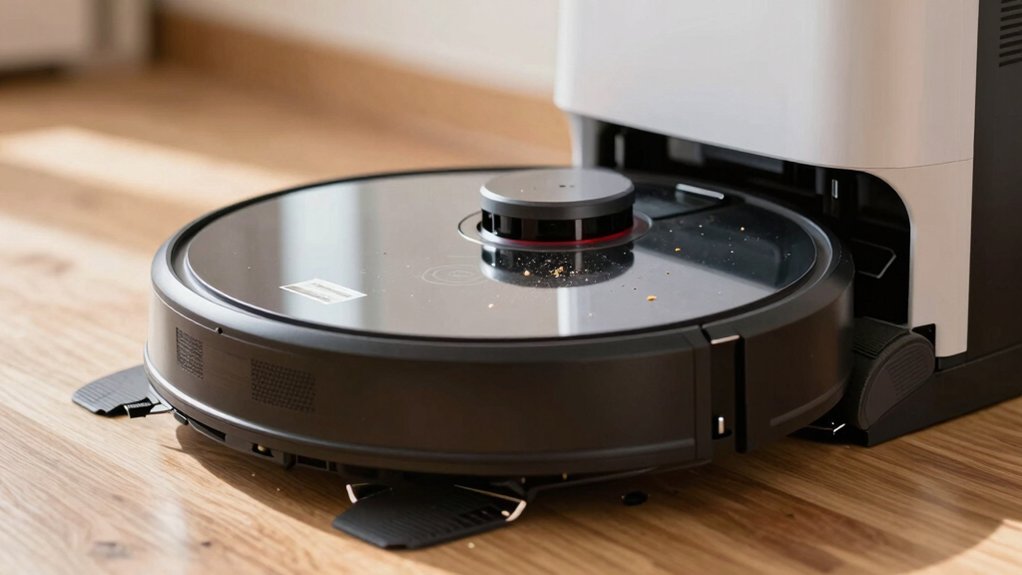
An auto-empty dock uses a sealed, bagged base and a powerful suction motor to pull debris from your robot’s internal bin into the base when the robot docks or you trigger it.
Airflow is routed from the robot’s intake behind the main brush into a separate dustbin with high-efficiency filtration to trap fine particles.
You’ll reduce manual emptying; however, pet hair and heavy debris need more checks.
Keep going to see how timing, filters, and maintenance affect performance.
Quick Overview
- The dock uses a suction motor to transfer debris from the robot’s internal bin into a sealed, bagged base for hands-free emptying.
- Suction activates when the robot docks, via app, or by a manual button; it runs for a user-set 15–30 second cycle.
- Airflow pulls dirt from behind the main brush housing into a 3-liter bag while dock brushes clean charging contacts.
- A high-efficiency filter in the base captures up to 99.99% of particles down to 0.3 microns; this minimizes dust exposure.
- Smart mode adjusts suction duration based on recent cleaning length. Pet hair increases clog risk and bag replacement frequency.
Quick Answer: Should You Get an Auto-Empty Dock?
Wondering if an auto-empty dock is worth it? You’ll likely find it valuable if you want less hands-on emptying. The dock transfers debris from the robot to a sealed bag via suction for a controlled 15–30 second cycle. You can set this cycle in the app, on the robot, or let a smart mode vary based on cleaning time.
Filtration rated up to 99.99% at 0.3 microns and separated dustbin design improve airflow and reduce exposure when the dock empties. That said, pet hair and heavy shedding raise maintenance needs: more frequent checks and filter/bag changes help prevent clog risks around the brush housing and side air passages.
Performance matches other docks; so your decision hinges on convenience versus upkeep. If you prioritize hands-off operation and don’t mind occasional maintenance for pet hair, an auto-empty dock is a practical upgrade.
How Auto-Empty Docks Transfer Debris and Why It Matters
How does the dock actually move dirt from the robot into the base? You trigger a suction motor automatically when the robot docks or manually via app or the robot’s home button, and airflow pulls debris from the robot’s bin into a sealed bag in the base. The suction targets material behind the main brush housing; this is a deliberate change that improves pickup of hair and crumbs compared with earlier designs. Brushes inside the dock also clean the robot’s charging electrodes during transfer; this helps sustain reliable suction cycles.
This separation of robot bin and base dustbin, plus high-efficiency filtration capturing 99.99% down to 0.3 microns, keeps fine particles contained and reduces airborne dust when you choose auto empty versus manual. You can set motor run time (15–30 seconds) to match load, which affects maintenance frequency. Longer runs empty more thoroughly but fill bags faster. Adjust settings to balance cleaning completeness against how often you change bags.
Auto-Empty Dock Components and What Each Part Does
Now that you know how debris moves from robot to base, let’s look at the parts that make that happen. The base contains a main bagged bin that receives debris; its separation from the robot dustbin and a dedicated side air passage maintains controlled dustbin airflow for efficient transfer.
Inside the robot, you’ll remove a plastic door to open the air intake during suction-assisted emptying. A suction motor in the dock creates the pressure differential that pulls debris into the bagged bin while brushes clean the robot’s charging electrodes to preserve charging contacts and hygiene.
A separate dustbin housing in the dock holds the robot’s removable bin and routes air through a high-performance filter rated at 99.99% down to 0.3 microns. That filtration efficacy captures fine dust during emptying and reduces particulate escape.
Modular design keeps the bag, dustbin, motor, brushes, and filter accessible for maintenance and reliable performance.
How Triggers and Smart Mode Control Emptying Times
When should the dock kick in and for how long depends on a mix of triggers and modes you control. You can start emptying via the app, the robot’s home button, or a manual press on the robot. Those options give you flexible trigger timing so you’re not relying solely on automatic returns.
By default, the base runs its suction during docking for a user-set motor time (commonly 15–30 seconds), which directly controls how much debris moves from the brush cavity into the bin.
Smart mode refines that basic schedule by dynamically adjusting suction length based on the robot’s recent cleaning time. Longer cleans typically prompt longer transfer cycles; shorter cleans shorten them. The system targets debris behind the main brush housing while the base’s brushes sweep charging contacts to maintain docking reliability.
In practice, you’ll tweak trigger timing and smart mode settings to balance emptying completeness against noise and power use.
What to Expect: Suction, Filtration, Pet-Hair Limits, and Real-World Performance
Having set triggers and smart mode to suit your schedule, you will want to understand what actually happens during emptying. The dock uses suction to pull debris from behind the robot’s main brush housing into a 3‑liter bag. The filtration is rated at 99.99% down to 0.3 microns to catch fine dust released during transfer.
Expect efficient capture of fine particulate; however, real-world performance depends on load, suction limitations, and run-time settings (15–30 seconds or smart-adjusted). Pet-hair impact is the main variable: hair collects around the transfer path and can raise clog risk.
- Suction strength moves dirt reliably from the brush zone but can leave long hair snagged or require extra motor run time.
- Filtration is high-rated HEPA-like media that keeps expelled dust minimal; replace bags per usage.
- Practical use: for heavy-shedding pets, plan weekly checks. Otherwise, smart mode and app triggers handle most transfers without fuss.
Daily Setup and Maintenance Checklist : Preventing Clogs, Bag Changes, and Tips for Pet Owners
Want to keep your auto-empty system running reliably with pets in the house? Start with a brief daily checklist: clear large debris from the robot and dock, inspect behind the main brush housing where transfer targets accumulate, and wipe dock electrodes to preserve charging and hygiene.
For shedding pets, perform weekly deeper checks to prevent clogs and maintain suction during emptying. Manually trigger the auto-empty via the app or home button if you notice slow transfer. Adjust motor run time to 15–30 seconds for stubborn loads.
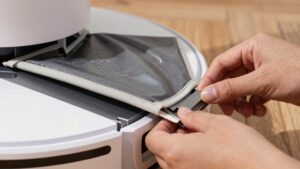
Track bag usage against the 3-liter capacity; typical bags last about eight weeks but shorten with heavy shedding. When replacing bags, seal and dispose of debris promptly to protect user safety and reduce allergen spread.
Maintain pet care routines that limit loose hair on floors (brushing, designated pet zones) to extend bag life and lower clog risk. Consistent, focused maintenance keeps airflow optimal and emptying reliable.
Frequently Asked Questions
Can an Auto-Empty Dock Damage Delicate Floors During Docking?
Yes, you should be cautious; delicate floors can suffer from docking impact if the dock or robot has hard edges, abrasive feet, or uneven contact. You’ll inspect third party compatibility to avoid mismatched heights or connectors.
Check noise levels and堵 blockage detection to ensure gentle operation and prevent repeated forceful attempts. Keep replacement bags and suction settings accessible, and use soft bumpers or felt pads to minimize wear during docking.
Do Auto-Empty Docks Work With Third-Party Robot Models?
Sometimes. You’ll find auto empty compatibility varies by brand and model; many docks only work with their own robots, while a few third party models are supported via shared protocols or adapters.
Check specs and firmware notes, confirm suction/port alignment, and verify app pairing before buying. If compatibility isn’t listed, don’t assume it’ll work. Contact manufacturers or look for community-tested pairings to avoid wasted purchases and functionality gaps.
How Noisy Are Docks During Nighttime Emptying?
You’ll usually hear moderate noise intensity during nighttime operation; it’s not silent. Docks create a short burst of suction and motor sound while emptying, often comparable to a low vacuum or loud fan. Noise peaks last 10–30 seconds, then drop.
You can schedule emptying for daytime, enable quiet modes if available, or add soundproofing (closed door, rug, soft barrier) to reduce disturbance without affecting performance.
Are Replacement Bags and Filters Proprietary or Universal?
Mostly proprietary; though some brands use standardized sizes you can find third-party. You’ll want to check replacement compatibility before buying. Many docks require brand-specific bags and filters for proper fit and sensor alignment.
Filter accessibility varies: some docks give easy front or top access for quick swaps. Others tuck filters inside sealed bins, making changes fiddlier. Prioritize models with clear filter accessibility and confirmed compatible third-party options if you want flexibility.
Can the Dock Detect and Stop Emptying if There’s a Blockage?
Yes, many docks can detect and stop emptying if there’s a blockage. You’ll see blockage detection via pressure, motor current, or airflow sensors that sense reduced flow or stalls. When detected, the dock halts the suction cycle, logs an error, and alerts you through the app or indicator light to clear the jam.
This docking safety prevents motor damage and limits spills. It keeps maintenance straightforward and predictable.
Conclusion
Auto-empty docks save time and reduce mess, but they’re not magic. You’ll get consistent pickup when the dock’s suction, seals and filtration work together; yet expect limits with fine dust, dense pet hair and bulky debris.
Keep triggers and smart modes tuned for your schedule. Swap bags or clean the bin on schedule, and clear brush and hoses to prevent clogs.
For pet owners, choose stronger suction and HEPA options. Plan for occasional manual cleanups.