Auto-Empty Dock Vs Bagless Base Differences
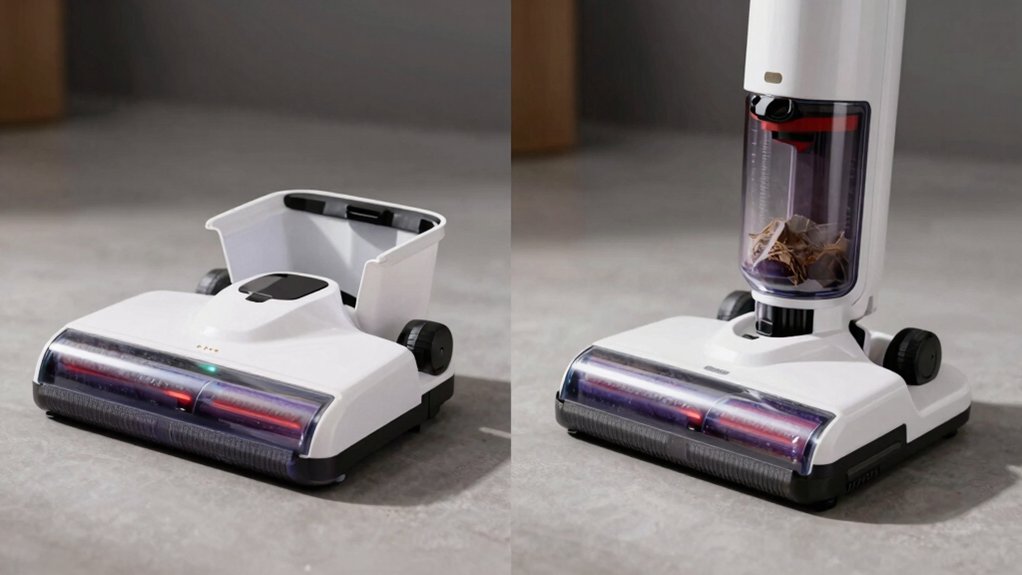
If you want low-touch, sealed disposal and less dust exposure, pick the bagged auto‑empty dock. It costs about $299 plus bags (~$4 each) and gives ~120 days between bag swaps.
If you’d rather skip recurring bag buys, choose the $65 bagless add‑on for the same dock. However, expect more frequent washing, a 24‑hour dry time, and higher dust exposure when emptying. Continue below to see costs, maintenance, and allergy tradeoffs.
Quick Overview
- Bagged auto-empty docks use sealed disposable bags, reducing dust exposure during disposal compared with bagless canisters.
- Bagless bases eliminate bag purchases but require periodic washing and 24-hour drying of filters and canisters.
- Bagged docks typically need bag replacement around every 120 days; bagless canisters often reach ~75% full in ~42 days.
- Bagged systems cost about $341 over two years (dock + bags); bagless add-on totals about $364 over two years.
- Choose bagged for low-touch, allergy-friendly containment. Choose bagless to avoid recurring bag costs but accept more maintenance.
Quick Verdict : Pick Bagged vs Bagless for the S7 Dock
Wondering which is better for your S7 Dock: bagged or bagless? You’ll favor bagged advantages if you want low-touch disposal and less dust exposure. The replaceable bags hold about 120 days of debris and cut direct contact when you swap them. You’ll prefer bagless only if you want to skip ongoing bag purchases and don’t mind extra upkeep. The canister system lasts roughly 42 days between emptying but calls for periodic washing and careful drying.
Both maintain similar suction performance; so cleaning effectiveness shouldn’t drive your choice. Consider maintenance habits: bagless drawbacks include more frequent dumping and potential dust exposure that might require a mask.
Consider convenience: bagged needs replacement bags (~$4 each; a 12-pack runs about $42 and lasts ~2 years). Bagless has a lower upfront addon cost but higher hands-on time. Pick bagged for cleanliness and convenience; pick bagless if you want to avoid recurring bag purchases and don’t mind the upkeep.
Upfront Costs & When Bagless Pays Off
How much extra will you pay upfront, and when does that cost justify skipping bags? You’re looking at a $299 dock for the bagged configuration; choosing bagless means adding a $65 add-on. For an upfront comparison, that $65 is your premium to avoid buying replacement bags.
The bagged advantage is clear initially: you don’t have to wash parts, and fresh bags cost about $4 each. A 12-pack runs roughly two years, so routine bag purchases stretch costs over time. The bagless route cuts ongoing bag expenses but introduces maintenance: washing the canister and cone filter every ~120 days with a 24-hour dry time.
Given typical usage, the bagless option generally takes more than two years to break even versus continuing to buy bags. So you’ll weigh paying $65 now against the inconvenience of quarterly cleaning and the time horizon you expect to keep the dock before savings offset that upfront comparison.
Long‑Term Cost Comparison: Bags, Add‑Ons, and Break‑Even
You’ve already weighed the upfront math; now compare total ownership costs over time to see which setup really saves you money. You’ll pay $299 for the dock with the bagged configuration. The bagless add-on is $65 and fits the same S7 dock. Factor in ongoing bag costs and maintenance to judge the bagged advantage versus bagless.
| Item | Two‑Year Cost |
|---|---|
| Dock + bags (12) | $299 + $42 = $341 |
| Dock + bagless add‑on | $299 + $65 = $364 |
Over two years, the bagged route costs about $23 less; this delivers immediate long term savings. Bagless removes bag purchases but adds time‑consuming dumping, plus washing and 24‑hour drying of the cone filter and canister. You’re also exposed to dust during dumping. Given the maintenance burden and modest upfront saving, bagless often won’t break even in two years.
Choose bagged if you prioritize lower hands‑on care and predictable consumable costs.
Filtration Details & How Dust Is Contained
Curious about how each dock keeps dust contained? You’ll find the bagged dock uses a replaceable bag in the filtration path plus conical and semi-circular filters; this creates a HEPA-like filtration containment approach that traps particles inside the sealed bag. When you remove the bag, you’re minimizing dust exposure because debris stays enclosed until disposal.
The bagless dock, by contrast, relies on an internal canister with a cone filter inside the dock. You empty that canister into the trash; the act of dumping raises the chance of dust exposure.
You’ll also note maintenance differences that affect containment: bagless internal filters and the canister need periodic washing and a 24-hour dry time. Cleanable parts are rated around 120 days for maintainability, while the bagged system avoids wet maintenance but requires ongoing bag replacements.
In short, bagged docks prioritize sealed filtration containment to reduce user dust exposure; bagless favors reusable components with higher handling responsibility.
Weekly & Monthly Maintenance: Emptying, Washing, Drying
Now that you know how each dock contains dust, let’s look at the routine upkeep that keeps them working and reduces exposure: weekly emptying and the periodic washing/drying steps. You’ll follow different maintenance tasks depending on the dock.
With a bagged auto-empty dock, you simply remove and replace the sealed bag as part of weekly cleaning routines. There’s no washing or drying of filters, so upkeep is quicker and less likely to stir dust.
With a bagless base, weekly emptying means dumping the internal canister into the trash, which can expose you to dust and takes more care. Periodically, about every 120 days, you’ll detach the cone filter and canister for washing. Then allow a full 24-hour dry time before reassembly.
Those cleaning routines reduce long-term replacement needs for bagless systems but require more steps and precise drying. Choose based on how much hands-on maintenance you want.
Disposal Experience: Dust Exposure and Safety Tips
How messy will disposal feel each week depends on whether your dock uses a sealed bag or a bagless canister. With a bagged dock, you avoid most dust exposure: debris stays inside a replaceable bag, you drop it into the trash and seal the new bag, and you rarely touch dust.
Bagless disposal is more hands-on. You dump the canister over a trash bin, which can scatter fine particles. Users often wear a mask during this step to limit inhalation. After dumping, you must wash the cone filter and canister and allow them to dry for about 24 hours before reuse, creating an extra maintenance cycle.
For disposal safety, always empty over a well-ventilated area. Consider a mask and gloves when handling loose debris, and wipe seals and dock openings regularly to prevent buildup. If minimizing dust exposure is a priority, choose a sealed-bag dock. If you prefer bagless, plan for cautious handling and extra cleaning.
Real‑World Performance & Capacity (How Long Between Empties)
After covering disposal and dust risks, let’s look at how often you’ll actually need to empty either system. In real world capacity tests, the bagless canister reached roughly 42 days per stated usage; it was sitting about three-quarters full after two months. The bagged dock stretched to about 120 days between replacements, giving you longer intervals. Suction stayed consistent for both over testing; thus, capacity—not performance—drives the decision.
If you want fewer interventions, the bagged option reduces the frequency of maintenance chores and trash handling. If you prefer to avoid disposable bags, expect to dump the canister about every six weeks; also, factor in canister washing and drying. If dust exposure concerns you, the bagged dock lowers contact risk during empties; even though both units perform similarly.
Choose based on tolerance for dust handling and how much you value longer gaps between empties versus bag-free convenience.
Who Should Choose S7 Dock Bagged vs Bagless
Who should pick the S7 Dock bagged vs bagless? If you dislike touching dust and value bagged durability, choose the bagged Dock: replaceable bags seal debris, cost about $4 each (a 12-pack lasts ~2 years), and disposal keeps allergens contained. You’ll pay $299 for the dock base and ongoing bag costs; however, you’ll avoid frequent filter washing.
If you prefer lower ongoing costs and simpler maintenance, opt for the bagless configuration. The add-on costs about $65 to fit the Dock, and you won’t buy bags. Bagless convenience means dumping the internal canister into a trash can and periodically washing the cone filter and canister. That exposes you to more dust unless you wear a mask.
Both options preserve suction and long-term performance, so decide by tolerance for dust during disposal versus willingness to pay for sealed bags and slightly less hands-on cleaning.
Quick Buying Checklist & Setup Tips
Want a quick checklist to pick and set up the right S7 Dock for your needs? Compare total cost, convenience, and dust control so you get the setup that matches your routine and allergies.
- Check costs: $299 for bagged dock versus $65 for bagless add-on; factor bagged vs dust containment and $4 per replacement bag (12-pack ≈ 2 years).
- Assess maintenance frequency: Bagless needs periodic washing/drying of the cone filter and canister; allow 24 hours dry. Bagged needs simple bag swaps.
- Consider exposure and safety: Bagged avoids direct dust exposure; bagless canister emptying may expose you to dust. Use a mask if sensitive.
Set up: Place the dock on hard, level floor near an outlet. Align the robot and run a test empty cycle. If you choose bagless, schedule a weekly or biweekly check depending on home dust levels. If allergies matter, prioritize bagged for superior containment.
Frequently Asked Questions
Can I Retrofit an Existing Dock to Use Bags?
You can sometimes retrofit an existing dock to use bags, but retrofit compatibility hinges on model design and manufacturer support. You’ll compare sealing fit, power connections, and dust-sensor alignment.
Bagless advantages like lower replacement costs and instant reuse contrast with bags’ cleaner disposal and allergen containment. Check manuals, parts availability, and firmware updates. If adapters exist, you’ll install them carefully and test suction and sensors to confirm proper operation.
Are Replacement Bags Recyclable or Biodegradable?
Mostly no; replacement bags aren’t usually biodegradable. However, some brands offer compostable or recycled replacement materials. You’ll compare disposal options: standard bags go to landfill or waste-to-energy. Certified compostable bags need industrial composting and separate collection.
Recyclable bags are rare; mixed-material bags often can’t be recycled curbside. Check manufacturer specs and local recycling/compost rules so you’ll choose the replacement materials and disposal options that actually reduce environmental impact.
Do Pets Trigger Bag Replacement More Often?
Yes, you’ll replace bags more often if you have pets. Pets vs efficiency matters: pet hair and dander fill dustbins quicker; so bags reach capacity sooner. You’ll notice noise vs capacity trade-offs too: frequent full indicators or louder emptying cycles can signal replacements are needed.
Compare frequency by pet size and shedding. Multi-pet homes require more frequent changes than single-pet or no-pet households to maintain suction and hygiene.
Can I Run the Dock Without Any Bag or Canister Installed?
No, you shouldn’t run the dock without a bag or canister installed because it needs a sealed containment to collect debris and protect the motor. You’ll compare models and note two word discussion ideas like “suction loss” and “filter clogging.”
For dock maintenance, always install the proper receptacle, check seals, and empty or replace bags regularly. That prevents messes, maintains performance, and avoids warranty-voiding damage.
Will Strong Odors Build up Inside a Bagged Dock?
Yes, strong odors can build up inside a bagged dock if the bag containment isn’t sealed well or if debris sits long. You’ll notice more scent when bags reach capacity versus fresh bags.
Compared with bagless bases, bag containment tends to trap odors until you change the bag. Bagless systems can vent smells earlier. To minimize buildup, replace bags regularly, use scented/odor-control bags, and store docks in ventilated areas.
Conclusion
If you value lower ongoing hassle and cleaner disposal, pick the S7 Dock with the bagged base. You’ll pay more upfront but change bags infrequently and avoid dust exposure.
Choose bagless if you want slightly lower recurring cost and don’t mind weekly emptying, washing filters, and dealing with more airborne dust.
Consider allergy sensitivity, household size, and budget: bigger homes or allergy sufferers lean bagged; minimalists or tight budgets lean bagless.