Shark Robot Vacuum Filter and Brush Compatibility Chart
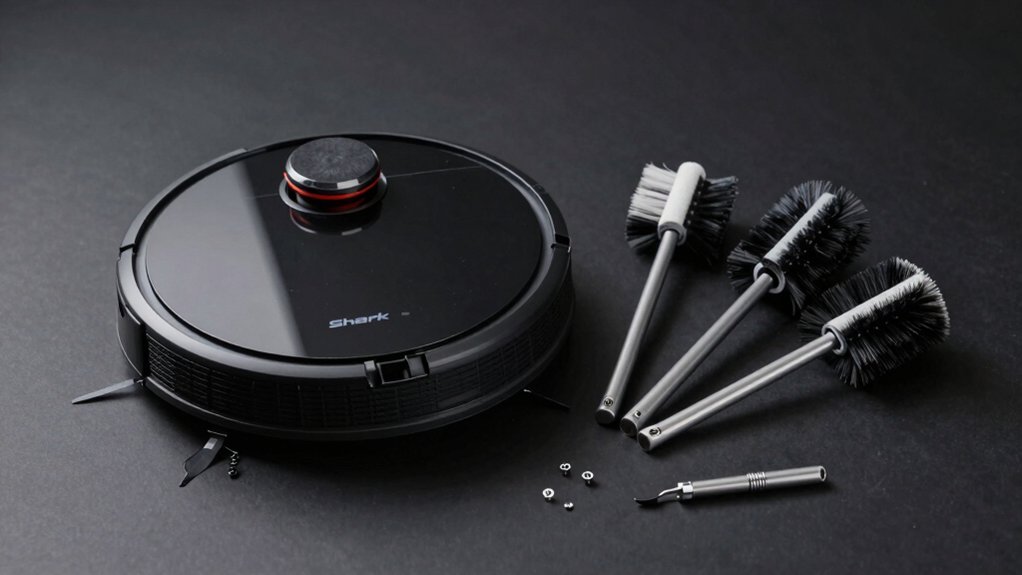
Use your pod label to match your Shark robot to the Matrix/AV series (RV2300S, AV2310AE, RV2310AE, RV2320S, UR2350AE) and choose parts like the Matrix pod (XPODRV2600WA $399.95), POWERDETECT pod (XPRV2800WD $384.99), pad plate (520KKU2600WA $21.99), or filters and brushes.
Replacement kits include brush roller, foam and standard filters, six side brushes, and a cleaning brush. Replace all items every six months. Continue for exact SKUs, pricing, and return tips.
Quick Overview
- Confirm your robot model (e.g., RV2300S, AV2310AE, RV2310AE, RV2320S, UR2350AE) before buying filters or brushes.
- Matrix-compatible pods use SKU XPODRV2600WA; PowerDetect pod uses XPRV2800WD.
- Replacement kits include 1 main brush, 2 foam filter sets, 2 additional filters, 6 side brushes, and 1 cleaning brush.
- Replace the main brush, foam filters, additional filters, and side brushes every six months for optimal performance.
- Cross-check part SKUs (e.g., 278KKU2800 brushroll $19.99; 520KKU2600WA pad $21.99; filters $14.99) before purchase.
Quick Reference: Shark Robot Parts & Compatibility Chart
Wondering which Shark Matrix parts fit your robot? You’ll get a concise chart-style summary so you can match parts by model and price. The XPODRV2600WA Pod lists at $399.95; the Matrix Robot Pad Plate 520KKU2600WA is $21.99. The Self-Cleaning Brushroll (278KKU2800) is $19.99. A replacement parts kit—$22.99—includes 1 main brush roller, 2 sets of foam filters, 2 additional filters, 6 side brushes, and 1 cleaning brush.
Filters alone (pre-motor and standard) are $14.99; the Li-ion battery is $59.95. Compatibility covers RV2300S and related AV2310AE, RV2310AE, RV2320S, UR2350AE models, ensuring broad coverage across the listed Matrix family. Use two word discussion ideas to quickly flag model-to-part matches. Avoid treating an unrelated topic here; keep focus on part numbers, prices, and compatibility.
You’ll save time with this methodical, data-driven snapshot for ordering and inventory decisions.
Identify Your Shark Robot & Find the Right Part Numbers
How do you quickly confirm which Shark Matrix model you own and which part numbers you need? Check the pod label and model list first: Matrix/AV series models include RV2300S, AV2310AE, RV2310AE, RV2320S, UR2350AE. Match that to part numbers in the chart: for example XPODRV2600WA ($399.95) and XPRV2800WD ($384.99).
Use the replacement kit mapping to verify coverage: 1 Main Brush Roller, 2 Sets of Foam Filters, 2 Filters, 6 Side Brushes, 1 Cleaning Brush. Note compatible components like the Self-Cleaning Brushroll 278KKU2800 ($19.99) and silicon side brushes 58MMSB2PK ($14.99). Record HEPA-style filter and anti-tangle brush attributes to avoid ordering wrong items.
Work methodically; document each serial and SKU to prevent disassembly mistakes that create undercover costs from needless returns or repairs. If unsure, cross-reference the exact SKU before purchase.
Exact Replacement Parts for Matrix and POWERDETECT Pods
Now that you’ve matched your Matrix/AV series model and mapped the main kit components, confirm exact replacement parts for the pod itself and its consumables to avoid ordering errors. You should verify model numbers and prices to ensure matrix compatibility and correct powerdetect pods selection. Use SKU cross-checks and vendor receipts when possible.
- Matrix Robot Pod: XPODRV2600WA — $399.95 (primary pod assembly)
- Shark POWERDETECT Robot Pod: XPRV2800WD — $384.99 (POWERDETECT pod assembly)
- Matrix Robot Pad Plate: 520KKU2600WA — $21.99 (pad/plate replacement)
- Pre-motor filter(s) for pods: listed under pod consumables; confirm exact fit per SKU
- Replacement Pod for Shark Robot: confirm matching part number before purchase
Follow a methodical checklist: confirm your robot model, match pod SKU, compare prices, and order only parts listed for matrix compatibility or specific powerdetect pods. Keep purchase records for returns or warranty claims.
Shark Robot Maintenance Schedule: When to Replace Filters & Brushes
When should you replace your Shark robot’s filters and brushes to keep peak performance? Follow a strict maintenance cadence: replace filters and brushes every 6 months for optimal suction and cleaning efficiency. You’ll wash and reuse reusable filters between replacements as part of regular cleaning. Replacement timing preserves operation on Matrix and RV2300S/UR/AV models.
| Part | Recommended Interval | Kit Contents (typical) |
|---|---|---|
| Main brush roller | 6 months | 1 main brush roller |
| Foam filters (sets) | 6 months | 2 sets of foam filters |
| Additional filters | 6 months | 2 additional filters |
| Side brushes | 6 months | 6 side brushes |
| Cleaning brush | 6 months | 1 cleaning brush |
Act on replacement timing regardless of appearance if performance drops. Compatibility guidance ensures parts fit specified models. Track dates and log changes to maintain a consistent maintenance cadence and avoid gradual suction loss.
Choosing Parts: Genuine Shark vs Third‑Party Replacements
After you’ve set a six-month replacement rhythm for filters and brushes, you’ll need to decide whether to buy genuine Shark parts or third-party alternatives. You’ll weigh cost, documented compatibility, and performance warranties. Genuine vs third party is often a tradeoff: Shark lists pods like the POWERDETECT and Matrix Pod at $399.95, pad plates at $21.99, and a Self-Cleaning Brushroll at $19.99. Kits for Matrix and RV2300S-compatible units include a main brush roller, foam filters, filters, six side brushes, and a cleaning brush; this supports broad model coverage (Matrix/AV2310AE/RV2310AE/RV2320S/UR2350AE).
Confirm compatibility verification against your exact model ID. Compare kit contents to needed parts and washability features. Factor life cycle: replace every six months as recommended. Evaluate price per part and warranty differences. Consider availability and return policy for third-party items.
Be methodical: document model numbers, verify compatibility verification, and choose based on measured cost versus documented fit and reuse.
Troubleshooting Fit and Performance After Replacing Parts
How should you approach fit and performance checks once you’ve installed replacement parts? Start with a visual and tactile inspection: confirm the kit’s 1 Main Brush Roller and 6 Side Brushes are seated correctly and that mounts match the RV2300S/AV2310AE/RV2310AE/RV2320S/UR2350AE matrices. Troubleshooting fit begins by reseating components. Proper alignment reduces tangling and eases installation.
Next, run measured Performance diagnostics. Ensure washable filters are fully dry before reinstalling; wet filters lower suction. Start a short run and monitor suction strength and brush engagement. If suction is reduced or side brushes bind, stop and verify brushes spin freely without obstruction and that the roller engages drive gears.
Replace wearable parts every 6 months for consistent results. Log findings (fit, noise, suction level, brush RPM or visible spin) to confirm resolution. If issues persist after reseating and drying filters, consult model-specific guidance or contact support for deeper diagnostic steps.
How This Chart Prevents Ordering the Wrong Shark Robot Parts
You’ve already checked fit and run diagnostics; now use the compatibility chart to prevent ordering the wrong parts. The chart gives compatibility confirmation by model (RV2300S Matrix and listed compatibles AV2310AE, RV2310AE, RV2320S, UR2350AE), so you match your serial/model before checkout.
It ties kit contents—1 main brush roller, 2 foam filter sets, 2 filters, 6 side brushes, 1 cleaning brush—to performance specs (True HEPA 99.97% @ 0.3 μm, upgraded silicon side brushes) and maintenance intervals (washable filters, replace every 6 months). It also links price and policies (USD $22.99, free 30-day returns) to add-to-cart options to reduce wrong part prevention risk.
- Confirm model against chart entries before selecting kits.
- Verify included components match your worn parts.
- Check HEPA and brush specs for performance needs.
- Note maintenance timing to plan replacements.
- Use price/return policy to mitigate ordering errors.
This methodical, data-driven approach minimizes mistakes and speeds correct replacements.
Frequently Asked Questions
Can I Clean and Reuse a HEPA Filter Instead of Replacing It?
You shouldn’t, you can’t reliably clean and reuse a true HEPA filter; performance drops. HEPA media traps 99.97% of 0.3 µm particles by design. Washing or vacuuming damages fibers and seal integrity. Instead, treat HEPA as a consumable and buy manufacturer-specified replacement parts.
For interim use, check pre-filters that can be washed. However, replace the HEPA on the schedule recommended to preserve filtration efficiency and airflow.
Are Replacement Parts Covered Under Shark’s Robot Vacuum Warranty?
Yes, replacement parts can be covered under Shark’s robot vacuum warranty if the defect is due to workmanship or materials within the warranty period. You should check your specific warranty terms for coverage limits, required proof of purchase, and claim process.
Verify parts compatibility before ordering replacements to avoid denied claims. Document failures, contact Shark support, and follow their authorized repair or replacement procedures to ensure warranty coverage is honored.
Do Replacement Brushes Work With Shark Robot Mops or Hybrid Models?
Yes, replacement brushes can work with Shark robot mops and hybrid models, but you’ll need to verify replacement compatibility per model. Check part numbers, mounting clips, and brush motor specs against your hybrid compatibility list.
Use manufacturer or OEM references and measure brush dimensions and connection types. If specs match, performance and warranty risks are minimal; if they don’t, choose model-specific parts to avoid fit or function failures.
Where Can I Recycle Used Filters and Brushes Responsibly?
You can recycle used filters and brushes through local e-waste or textile recycling programs and municipal hazardous-waste drop-offs that accept mixed appliance parts. Check manufacturer take-back or recycling initiatives and community repair cafés for proper disposal.
Separate cardboard packaging for reuse or curbside recycling. Record dates, locations, and accepted materials to ensure compliance. If components are contaminated, follow special disposal rules to avoid landfill contamination and potential fines.
Can I Mix Parts From Different Shark Robot Generations Safely?
You generally shouldn’t mix parts from different Shark robot generations without checking model-specific compatibility. Parts mixing can cause poor fit, reduced suction, or motor strain.
Verify exact model numbers, part codes, and manufacturer compatibility notes before swapping. Use official cross-reference charts or contact Shark support for data-driven confirmation.
If specs match (dimensions, connectors, RPM ratings), you can proceed; otherwise, stick to recommended replacements to avoid performance or warranty issues.
Conclusion
You now have a concise, data-driven guide to match your Shark robot model with the correct filter and brush part numbers, replacement intervals, and fit troubleshooting steps. Use the compatibility chart to confirm Matrix and POWERDETECT pod specifics. Pick genuine or vetted third-party options based on cost and warranty, and follow the maintenance schedule to sustain performance.
Cross-check dimensions and connector types before ordering to avoid wrong parts and downtime.
Related reading: Upright Vacuum Cleaners for — a closer look at this topic.