Where to Place a Robot Vacuum Dock for Reliable Performance
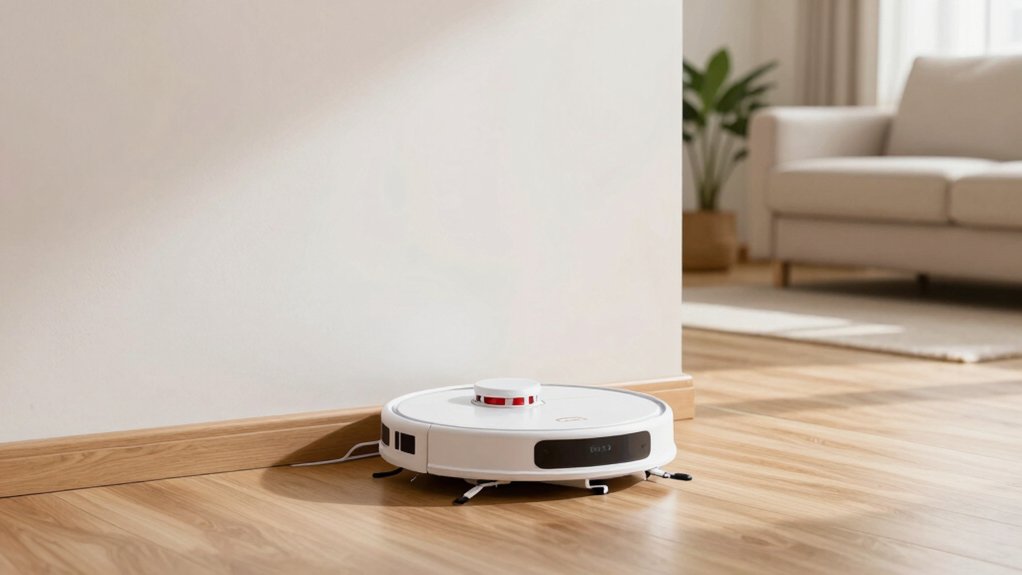
Place your robot vacuum dock against a flat, unobstructed wall in a central, high-traffic room with strong Wi-Fi. Leave at least 0.5 m (1.5 ft) clear on each side and 1.2 m (4 ft) of unobstructed approach in front. Keep it ≥1 m (3 ft) from stairs or drop edges, and put it on level, hard flooring.
Avoid windows and cluttered corners. Consider under-furniture installs only if clearance and power access are solid; more placement tips follow.
Quick Overview
- Place the dock flush against a stable, unobstructed wall in a central, high-traffic room with strong Wi‑Fi.
- Leave at least 0.5 m (1.5 ft) clearance on both sides and a minimum of 1.2 m (4 ft) clear approach in front.
- Avoid proximity to stairs, drop edges, windows, and cluttered corners. Keep at least 1.2 m (4 ft) from stairs.
- Put the dock on flat, hard flooring (not high‑pile carpet) and verify levelness with a spirit level or phone app.
- Ensure easy access to a power outlet, regular cleaning space, and maintain good Wi‑Fi coverage for reliable navigation and docking.
Quick Checklist: Ideal Dock Placement in 30 Seconds
Want to get your robot home fast? Use this 30‑second checklist to eliminate guesswork. Place the dock flush against a wall on a flat, stable surface; avoid high‑pile carpets that can obstruct charging contacts. Leave at least 0.5 m (1.5 ft) clearance on each side and a minimum 1.2 m (4 ft) clear approach in front so the robot can align and dock reliably.
Keep the dock at least 1 m (3 ft) from stairs or drop edges to prevent falls or jams. Choose a central spot with strong Wi‑Fi to support navigation and remote commands. Confirm the floor is level and the dock won’t wobble when the robot pushes against it. Don’t overcomplicate this checklist with topic drift or unrelated context; stick to clear measurements and simple placement rules.
Run one test return after positioning. If the robot docks consistently, you’re done.
Best Room and Wall for the Dock (Criteria and Examples)
Now that you’ve confirmed the dock’s flat, wall-flush placement and clearances, pick the room and wall that give the robot the best operational return: choose a central, high-traffic room with strong Wi-Fi where the dock can sit flush against an unobstructed wall. Keep at least 0.5 m (1.5 ft) clear on each side and 1.2 m (4 ft) in front. Avoid windows, cluttered corners, and locations within 1.2 m of stairs or drop edges so the robot can reliably navigate, recharge, and maximize dirt pickup.
Practically, place the dock in a living room, hallway junction, or kitchen entry; these are areas that collect the most debris and maintain consistent signal. Avoid dodgy corners that trap the robot or clutter that causes misdocking. Don’t put the dock on glossy surfaces that reflect sensors; use a matte mat or hard floor. If you have multiple candidates, prioritize the room with steady Wi-Fi and the wall that offers unobstructed access from three directions to reduce retries and missed cleaning cycles.
Dock Clearance and Spacing Specs (Sides, Front, Stairs, Virtual Barriers)
Where should you give the dock room to breathe? Follow clear dock clearance and spacing specs so your robot finds home reliably. Leave at least 0.5 meters (1.5 feet) on each side of the dock to avoid side collisions and allow approach angles.
Provide a minimum of 1.2 meters (4 feet) in front so the robot can align, turn, and dock without obstruction. Maintain at least 1.2 meters (4 feet) between the dock and any stairs to prevent misreads and accidental falls; this also gives the robot room to reverse safely.
If you use Virtual Wall barriers, keep them at least 2.4 meters (8 feet) from the dock to prevent signal interference and navigation confusion. Position the Virtual Wall facing away from the docking base to aid alignment rather than block it.
These spacing specs are practical, measurable, and repeatable. Measure with a tape, set clear zones, and test a few returns to confirm reliable performance.
Flooring, Level-Ground Checks, and Hidden-Dock Options
How level is the spot you’re planning for the dock? Do level ground checks with a small spirit level or phone app: even a few degrees can cause misalignments. For reliable docking, place the dock on flat, hard surfaces. Flooring considerations matter because high‑pile carpet near the dock will disturb sensors and wheels.
Keep at least 1.5 ft (0.5 m) clearance each side and 4 ft (1.2 m) in front so the robot can approach straight on. If you hide the dock beneath furniture, confirm there’s enough clearance underneath. Also, ensure that you can reach the plug and clean regularly. An accessible, uncluttered location reduces failed docks and wear.
| Emotion | Reality |
|---|---|
| Relief | Smooth, consistent docks |
| Confidence | Measured level ground checks |
| Ease | Clear, reachable hidden docks |
Follow these practical, data‑driven steps to minimize docking issues across varied floors.
Troubleshooting: Wi‑Fi, Maps, Remapping, and When to Move the Dock
Having trouble with missed docks or unreliable maps? Start with Wi-Fi troubleshooting: ensure strong Wi-Fi in the docking room so the iRobot HOME App and robot can communicate and handle navigation retries. Measure coverage and, if needed, move the router or add an extender. Weak signals correlate with higher docking failures.
Verify dock clearance: at least 1.5 ft (0.5 m) each side and 4 ft (1.2 m) in front so automatic retries can succeed. If the robot still misses the base or its map seems off, perform map relegation: delete the existing map and remap the space. Only move the dock when problems persist or coverage is poor. Base placement against a wall and centrally located improves accuracy and reach.
After remapping or relocating, confirm a clear path with ~0.5–1 m side clearance and ≥1 m in front. Test a few runs and monitor retry rates. Persistent errors indicate further placement or connectivity adjustments.
Frequently Asked Questions
How Often Should I Clean the Dock’s Charging Contacts?
You should clean the dock’s charging contacts every 1–2 weeks for regular use. Clean after heavy use or visible buildup. This cleaning frequency prevents connectivity issues and maintains battery charging efficiency.
For contact maintenance, wipe contacts with a dry microfiber cloth and, if needed, a cotton swab lightly moistened with isopropyl alcohol. Then let dry. Track performance and adjust the interval to biweekly or monthly based on dust levels and charging reliability.
No, most robots won’t automatically use multiple robot docks; they pair to one primary dock in firmware. You can set backup docks on some models manually, but automatic switching is rare.
For reliable charging etiquette, position docks consistently, keep contacts clean, and update firmware: manufacturer specs show higher return success when docking spots are standardized. Check your model’s manual for multi-dock support and any required configuration steps before relying on it.
Will Direct Sunlight Damage the Dock or Robot Sensors?
Yes, direct sunlight can cause sensor degradation over time. So, don’t expose the dock or robot to prolonged intense sun. UV and heat can fade plastics, warp components, and reduce sensor accuracy.
Place the dock in shaded, temperature-stable spots. Avoid windows during peak sun, and use curtains or blinds if needed. Regularly inspect and clean sensors; manufacturers’ specs often note acceptable temperature and light exposure limits.
Does Humidity Affect Docking Reliability Over Time?
Yes, humidity effects can reduce docking reliability over time. You’ll see corrosion on contacts, swelling in plastic parts, and degraded adhesives or sensors when moisture is high.
Keep the dock in a well-ventilated, low-humidity area: ideally 30–50% RH. Use silica packs, periodic contact cleaning, and check for condensation after showers or HVAC cycles. Track failure rates and humidity levels to link environmental exposure with performance degradation.
Are Extension Cords or Surge Protectors Safe for the Dock?
Yes, you can use extension cords or surge protectors for the dock, but prioritize safety and low resistance. Choose a heavy-gauge extension cord rated for the vacuum’s amperage and a surge protector with a high joule rating.
Keep connections off the floor, avoid daisy-chaining, and minimize cord length to reduce voltage drop. Regularly inspect for heat or wear; if you see either, replace the cord or plug directly into a wall outlet.
Conclusion
Place the dock where the robot can reliably find it: against a clear wall in a central, low-traffic spot on level flooring. Keep specified clearances (about 0.5–1 m front, 0.3–0.5 m sides) away from stairs. Avoid rugs or reflective surfaces.
Ensure steady Wi‑Fi and minimal interference for mapping. If you see missed cleanings or navigation errors, remap or move the dock incrementally until performance and battery recharge consistency meet your needs.
You may also like: Vacuum Height Clearance Measuring Guide — a related guide worth bookmarking.