Mop Washing Dock Features Explained
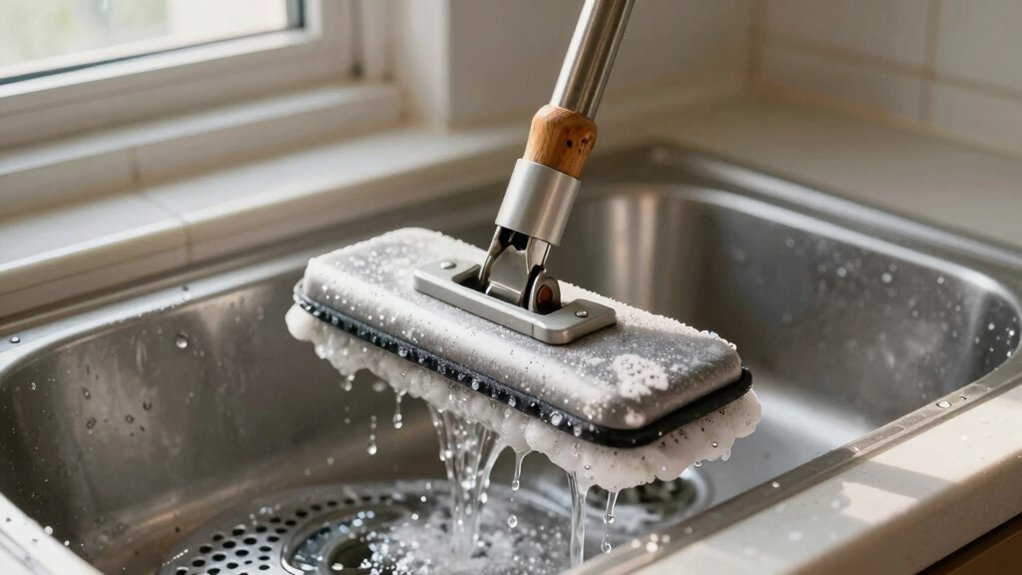
A mop-washing dock automates cleaning, drying, refill, and waste so you don’t babysit mop pads. It runs programmed wash, soak, rinse, and dry stages; meters detergent; drains dirty water; and can self-empty, recharge, and report status.
Real heated docks tend to reach ~100–114°F in practice, not marketing highs. Therefore, prioritize measured output, continuous rinse, and pad-type compatibility.
Expect consumable tracking and periodic maintenance. Keep going to see detailed tradeoffs and test-based guidance.
Quick Overview
- A mop-washing dock automates charging, pad washing, dirty-water disposal, solution refill, and status alerts through an app.
- Cleaning cycles include programmed wash, soak, rinse, and dry stages using mechanical agitation, detergents, and forced air.
- Heated docks speed cleaning and drying. However, real-world temps typically reach ~113–114°F, not marketing maxima.
- Continuous-rinse and dirty-water separation improve cleanliness; this prevents cross-contamination of pads.
- Evaluate docks by measured temperature, cycle effectiveness, maintenance needs, and pad compatibility for durability and safety.
What a Mop‑Washing Dock Does and Why It Matters
What does a mop-washing dock actually do? You place the robot on the dock, and it automates mop pad care: it runs pads through a controlled wash cycle, extracts dirty water, then dries pads to limit odor and bacterial growth. You’ll also get automatic water refills and often a self-emptying base, so routine maintenance needs minimal hands-on work.
In practice, dock water temperatures vary by model and rarely hit marketing peaks. Top performers reach about 113–114°F, which is sufficient for most cleaning tasks.
As the central maintenance hub, the dock coordinates charging, mop care, dust disposal, solution refills, and status alerts through the app. Design choices affect mop pad durability and the dock footprint. You judge tradeoffs between compact size and features like continuous rinse or dirty-water separation. Choose a dock that balances performance with the space you can allocate.
Cleaning Subsystems: Wash, Soak, Rinse, Dry
Now that you know how the dock handles overall mop care, let’s look at how it actually cleans the pad: docks run programmed wash, soak, rinse, and dry stages that remove soil, dissolve residues, flush out dirty water, then dry fibers to limit odor and microbial growth. You’ll see the wash stage apply mechanical agitation and detergent to dislodge particulates. Soak lets chemistry reach stains and affects coating stability on treated pads.
Rinse cycles flush suspended solids; some docks use continuous rinse with dirty-water separation to prevent redeposition. Drying applies forced air or heated flow to lower residual moisture and limit microbial growth. You should confirm sensor calibration for water level and temperature controls. Lab methods use a laser thermometer with three readings per cycle plus a mid-cycle check and a 7.1°F offset for consistency.
Note onboard heated mopping water can supplement dock cycles; however, drying and effective dirty-water management remain primary defenses against odor and bacterial buildup.
Mop‑Washing Docks: Temperature Claims vs Real World
How hot is the water your mop dock actually delivers, and why does that matter for cleaning efficacy? You’ll find heated claims from manufacturers range widely; some cite 75°C to boiling, but real world measurements tell a different story. You should expect lower practical temperatures than advertised. Performance depends on heater design, insulation, and cycle timing, not just spec sheets.
Independent tests show Roborock Saros Z70 produced the highest actual wash temp at 114.1°F, with Ecovacs Deebot X11 OmniCyclone close behind at 113.1°F despite a low official rating. Dreame Aqua10 Roller and Shark PowerDetect ThermaCharged tied near 111.1°F. MOVA Z60 Ultra revealed a notable gap: an official claim similar to Roborock but only 83.1°F in practice.
When you evaluate docks, prioritize measured output, warm-up consistency, and documented test results over heated claims. Those real world figures better predict microbial reduction and detergent activation during a wash cycle.
How Docks Clean Flat, Roller, and Spun Mop Pads
Curious about what actually happens inside a mop-washing dock? You’ll see a controlled sequence: circulating water, targeted spinning, mechanical scrubbing, then rinsing. The dock adapts agitation to mop pad materials: flat pads get high-flow flushing with moderate rotation; roller and spun pads receive stronger spin and scrub cycles plus slightly higher temperatures to compensate for deeper entrapment of soil.
Real-world systems monitor water temperature mid-cycle. Tests report 113–114°F and adjust duration to maintain efficacy. Continuous rinse designs use multiple nozzles to separate dirty effluent from reusable rinse water, improving cleaning efficiency without cross-contamination. Mechanical fixtures secure pads to minimize misalignment and optimize vibration reduction during high-speed spins.
Drainage and refill steps run automatically between phases. Debris and detergent are expelled before the final rinse. You control cycle selection through presets or automatic detection that match agitation intensity and temperature profile to pad type for reliable cleaning.
How Docks Store, Dose, and Dispose Cleaning Solution
Where does the cleaning solution live and how does it move through the cycle? You’ll find solution in a dedicated detergent reservoir. The dock controls detergent dosing electronically and meters concentrate into the water reservoir during the auto wash. The dock runs a full wash, multi-stage rinse, optional disinfect/deodorize, then an auto-dry to limit moisture and odor. Some designs separate dirty wastewater from clean rinse water to avoid recontamination and simplify mop pad disposal of spent fluid and solids.
| Component | Function | Result |
|---|---|---|
| Detergent reservoir | Stores concentrate | Controlled dosing |
| Water reservoir | Carries wash water | Wash + rinse cycles |
| Waste tank | Collects used water | Prevents re-use |
| Drying chamber | Removes moisture | Ready storage |
You’ll operate detergent dosing via presets or manual calibration. Follow dock prompts to purge waste tank before service and to handle mop pad disposal per local regulations. The system minimizes operator handling.
Safety: Sensors, Materials, and Heat Protection
Why monitor mop dock temperatures closely? You’ll rely on safety sensors and calibrated readings to prevent excessive heat exposure that shortens pad life or damages dock components. Use laser thermometers with the documented 7.1°F calibration offset and take three readings per cycle. Repeat this across cycles to establish reproducible baselines and spot drift.
You’ll find real-world wash-water temps diverge from claims: top performers can hit ~114.1°F while others like Narwal Flow run ~113°F. Therefore, don’t trust brand maxima alone. Control logic should prioritize heat protection by limiting peak temperature and runtime. Additionally, it should trigger alerts or cooldowns when sensors detect excursions beyond safe thresholds.
Materials durability depends on both peak temperature and cumulative heat exposure. Specify pad-compatible maximums and validate with mid-cycle checks. Furthermore, log sensor data so you can adjust temperature profiles to balance cleaning efficacy against component wear.
Maintenance, Consumables, and Lifecycle Costs
Now that you’ve set temperature limits and logging protocols to protect pads and components, you should treat ongoing maintenance and consumables as operational drivers that determine total cost of ownership. You’ll rely on automated washing, drying, and refill systems to cut manual upkeep. However, real-world temp variance can reduce cleaning efficacy and shorten pad life. Track consumables lifecycle: pad replacements, 200 ml solution refills, and dust bags. Monitor filter and brush wear, and factor warranty coverage for dock-assisted processes into lifecycle models.
| Item | Replacement cadence |
|---|---|
| Mop pad | 3–12 months (use-dependent) |
| Cleaning solution | 200 ml per refill cycle |
| Dust bag / filter | Monthly to quarterly |
Plan preventive maintenance: schedule part inspections, validate auto-emptying bins and self-charging resume functions, and record anomalies from claimed temperatures. Prioritize dock durability, including mechanical seals, pumps, and heaters, to minimize downtime and lower total lifecycle costs.
Buying Checklist: Compare Docks Side‑by‑Side
How hot does a mop-wash dock actually get, and how should that affect your purchase decision? Start by comparing official heated temps versus measured real world results. Brands claim 75°C–100°C (167°F–212°F); however, calibrated laser readings (7.1°F offset applied) reveal practical differences that matter for sanitation and material tolerance.
Use a simple table in your head: Roborock Saros Z70 achieved the highest actual dock temp (114.1°F). Ecovacs Deebot X11 OmniCyclone nearly matched it (113.1°F) despite lower claims. Dreame Aqua10 Roller and Shark PowerDetect ThermaCharged tied next (~111.1°F). Narwal Flow and MOVA Z60 Ultra underperformed in practice (101.1°F and 83.1°F); this shows claim-to-reality gaps.
When choosing, prioritize measured dock temps and independent real world results over marketing numbers. Confirm materials can tolerate the measured temperatures. Additionally, weigh cleaning performance, cycle time, and maintenance needs alongside actual heated temps for a balanced purchase decision.
Are Heated Mop‑Washing Docks Worth It?
Wondering whether a heated mop‑washing dock is worth the extra cost? You’ll get faster pad cleaning and drying, which cuts odor and bacterial growth versus ambient-water docks. Heated testing shows real-world dock temps vary by model and can fall short of marketing claims. Roborock Saros Z70 reached ~114°F in practical tests. That means do not assume peak numbers; evaluate measured performance.
Consider these factors:
- Measured effectiveness: compare independent heated testing results, not only official specs, to confirm consistent wash temps.
- Feature set: weigh auto rinse/dry, water refill, and self-emptying—these can justify cost even if dock temps are modest.
- Dock design and cycle timing: these affect dock temps and actual cleaning since docking water, not floor-mopping water, determines pad heat.
- Value decision: choose models where real dock temps and auxiliary features align with your hygiene and convenience priorities.
Make decisions based on measured performance and feature mix, not marketing.
Frequently Asked Questions
Can the Dock Sanitize Against Viruses and Bacteria Without Chemicals?
Yes, you can sanitize against viruses and bacteria without chemicals. You’ll rely on sanitization methods like UV-C irradiation, heat/steam sterilization, and controlled ozone exposure as chemical alternatives.
You’ll validate efficacy with log-reduction testing, contact time, and continuous monitoring. You’ll ensure material compatibility, safety interlocks, and ventilation to prevent operator exposure.
You’ll document procedures, maintenance, and verification to maintain reliable, repeatable nonchemical sanitization performance.
How Noisy Is the Dock During Wash and Dry Cycles?
You’ll hear moderate noise levels during wash and higher during spin-dry. Typical cycle duration is 5–12 minutes; exposure is brief. Vibration intensity is low thanks to balanced rotors and rubber mounts, which keep movement contained and prevent drift.
Safety features include lid interlocks and vibration sensors that pause cycles if thresholds are exceeded. You can operate it in nearby rooms without excessive disturbance. However, avoid placing it on hollow floors.
Can I Use Third‑Party Mop Pads and Cleaning Solutions?
Yes, you can use third-party mop pads; however, check compatibility and attachment method. Ill-fitting pads reduce cleaning efficiency and may void warranty.
You can use third-party cleaning solutions if they’re chemically compatible with the dock’s materials and do not create excessive suds or residue. Always review manufacturer specifications for recommended pH, concentration, and dosing. Test new products on a small cycle, monitor performance, and document results to ensure safe, effective operation.
Does the Dock Work With Multiple Robot Models or Only One?
The dock works with multiple robots; you’ll find broad dock compatibility and model flexibility built in. Manufacturers usually list supported models and firmware ranges. The dock negotiates charging, data handshakes, and wash cycles automatically. You’ll want to verify alignment tolerances, connector types, and software versions to ensure full functionality.
For best results, update robot firmware, confirm compatibility sheets, and test a single unit before fleet deployment.
What Happens During a Power Outage Mid‑Cycle?
If a power outage occurs mid cycle, your dock pauses operations and saves the cycle state to nonvolatile memory. When power is restored, the dock runs a safety check; it resumes from the saved step and completes remaining rinse, suction, or drying tasks.
If battery backup is present, it finishes critical steps before shutdown. You’ll get an error log and notification. Manual intervention is limited to restarting or aborting the resumed cycle if needed.
Conclusion
You’ll want a mop‑washing dock that reliably removes soil, controls chemicals, and minimizes downtime. Focus on verified wash/soak/rinse/dry performance for your mop types, realistic temperature delivery, safe materials and sensors, straightforward dosing and waste handling, and predictable maintenance and consumable costs.
Compare lifecycle cost metrics and uptime guarantees rather than headline features. Heated docks can help in cold environments; however, justify the extra cost with measured performance and energy data before buying.
You may also like: Mop Washing Dock Cleaning Routine — a related guide worth bookmarking.